Google Personal Intelligence Can Now Use Gmail and Photos for Ads
Google's October 16 privacy policy lets Gmail and Photos data shape ads once connected to Search. We compared four policy versions and mapped the off switches.
- Published
- Reading time
- 7 min
- Category
- News & Analysis
Google's privacy policy no longer says, without conditions, that your Gmail and Google Photos content stays out of personalized ads. Since October 16, 2026, the policy adds an exception: if you connect Gmail or Photos to Google Search through Personal Intelligence, what Search learns from them can be used to show you ads. If you never connected them, nothing about your inbox or photo library changes, and if you did, you can disconnect them in your Google Account settings.
We compared the current policy with the three earlier 2026 versions in Google's archive on October 24, 2026, read Google's updated 2017 blog post about Gmail ads, and matched four Google help pages to the switches that control this. We don't have a Google account in our test setup, so the menu steps come from Google's help pages, not our own screens.
What happened
On October 16, 2026, Google published a new version of its Privacy Policy (opens in a new tab). The version in force since October 1 said: "We don't show you personalized ads based on your content from Drive, Gmail, or Photos." The new version keeps that sentence and adds "unless you choose to make data from these services available to other Google services that support personalized ads."
Two more passages changed. The policy now says Search or Gemini Apps may access data from Google Photos, Gmail, and Drive if you allow it, and that "Search may process some of the data that you allow Search to access to personalize content, including ads." The list of what ads can be based on grew from "your interests and activity across Google services" to "your interests, activity, or personalized content from Google services."
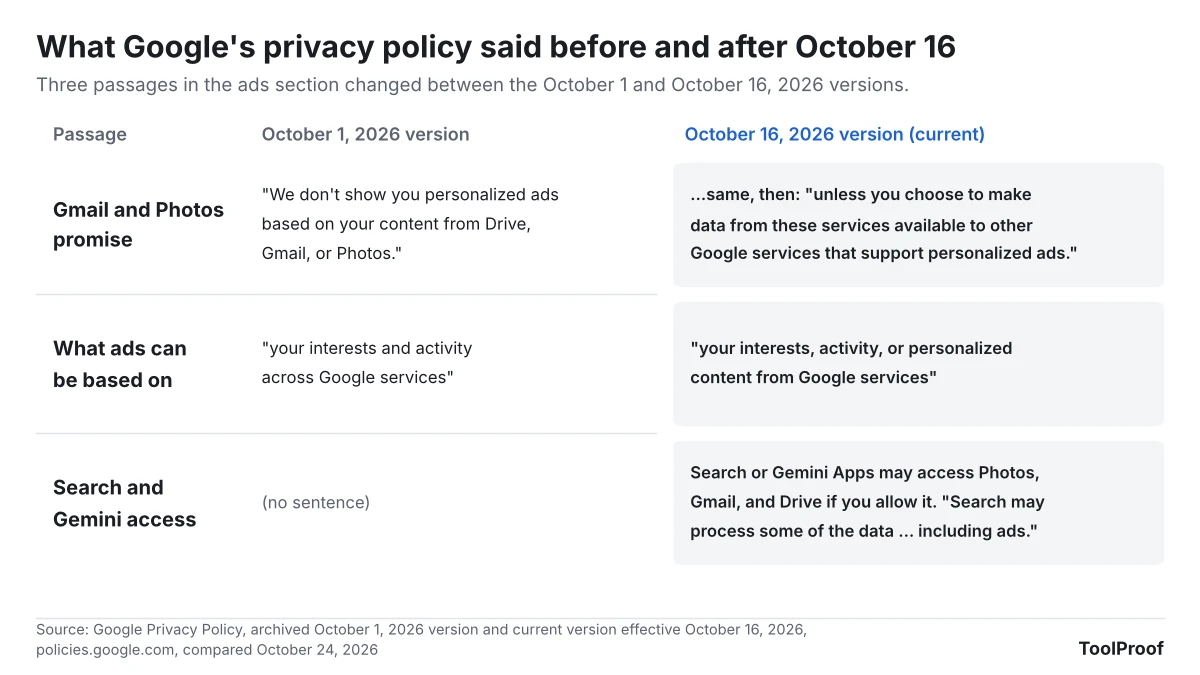
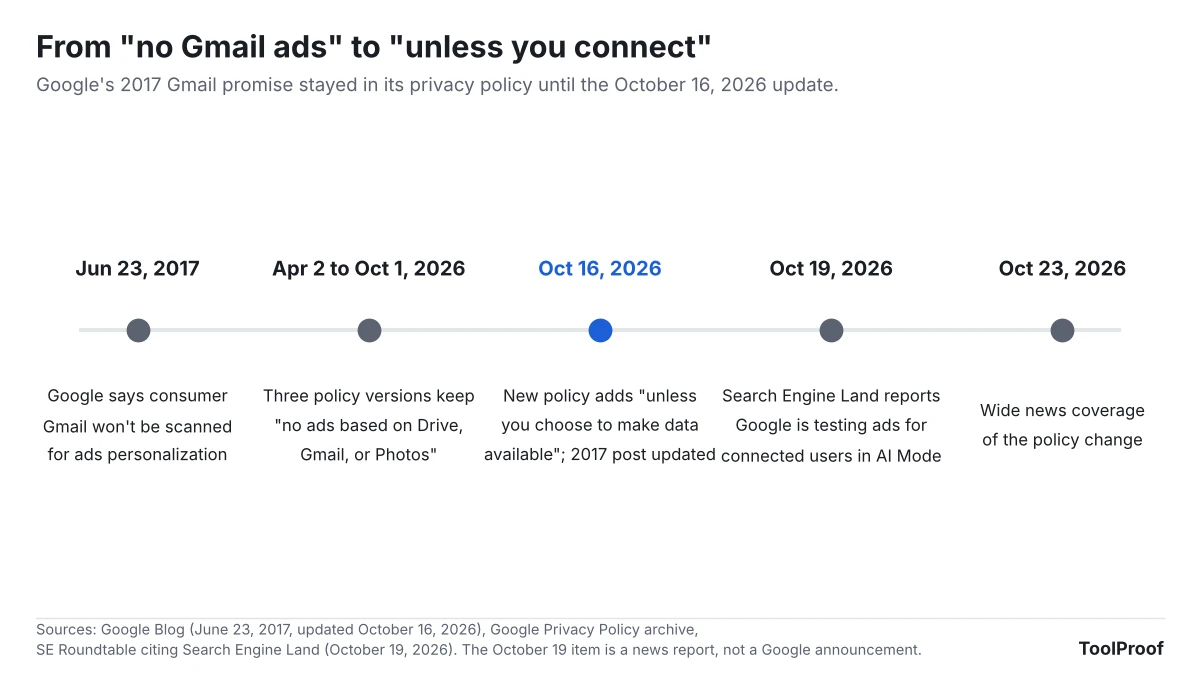
The same day, Google added an update note to its June 23, 2017 blog post (opens in a new tab) announcing that consumer Gmail "will not be used or scanned for any ads personalization." The note says that if users turn on features that connect Workspace apps to other Google services, "that same subset of data can also be used to show ads," depending on their settings.
Separately, SE Roundtable reported on October 19 that Google told Search Engine Land it is "starting to test ads in AI Mode in Search for users who connect their apps through Personal Intelligence."
Who is affected
Only people who connected Gmail or Google Photos to Search are affected. Google's Personal Intelligence help page (opens in a new tab) says connecting needs a personal Google account, an age of 18 or older, and the Personalized Recommendations setting turned on.
| If you... | What the change means |
|---|---|
| Never connected Gmail or Photos to Search | No change for your email or photos. Ads can still use your searches and other activity, as before |
| Connected Gmail, Calendar, or Photos to Search Personal Intelligence | Summaries and inferences from them can now shape ads in Search services |
| Connected Gmail to the Gemini app only | Google's Gemini Apps Privacy Hub (opens in a new tab) says Gemini chats "are not being used to show you ads" |
| Use a work or school account, or are under 18 | Not eligible for Personal Intelligence in Search |
| Live in the UK or the EU | Not in the list of supported countries yet |
We counted 194 countries and territories in the help page's supported list on October 24, 2026. It includes the US, Canada, Australia, India, Japan, South Korea, Brazil, and Mexico, but not the UK, Ireland, Germany, France, Spain, Italy, Poland, Norway, or Switzerland. Connecting Google Calendar works only in the US in English, and Google says connecting Photos isn't available in all regions.
What changes for you
Connecting is all or nothing across Google's search products. Google's help page says that once you connect, "all Search services will be permitted to access" Gmail, Calendar, and Photos: Google Search including AI Mode and Discover, Maps including Ask Maps, Shopping, Flights, Hotels, Translate, and News.
Google's answer to "will my Gmail inbox or Google Photos library be used to serve ads?" on the same page is: "Ads will not be based directly on your Gmail inbox or your Google Photos library." But it continues that Search "may reference summaries, excerpts and inferences from these sources," and "that same info may be used to show you ads." Google also says it won't use sensitive categories such as health or religion for personalized ads, and that advertisers don't get access to your Gmail or Photos.
The same page says connected data may be used to train Google's AI models and that human reviewers see some of it. Disconnecting doesn't delete your Search Services History, which "can still be used for product improvement."
What to do now
If you don't remember connecting anything, check once. These steps follow Google's help pages for Personal Intelligence (opens in a new tab), Personalized Recommendations (opens in a new tab), and My Ad Center (opens in a new tab).
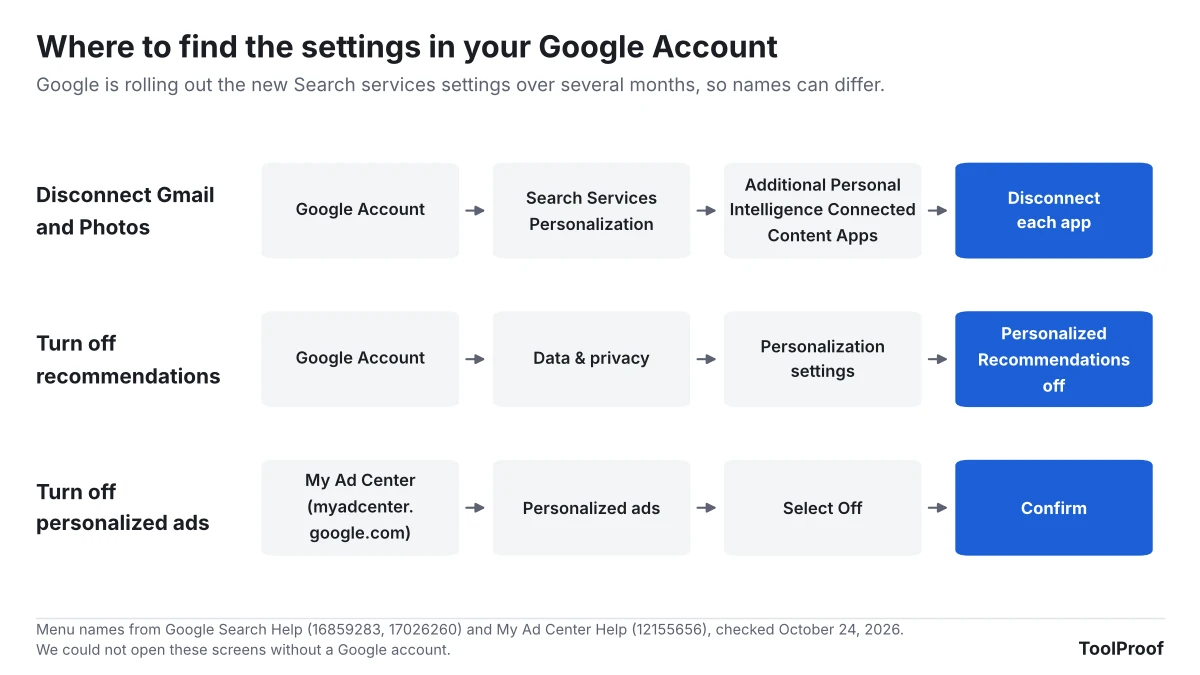
- On a computer, open your Google Account and go to Search Services Personalization (or go straight to google.com/search-personalization).
- Open Additional Personal Intelligence Connected Content Apps. If Google Workspace or Google Photos shows as connected, disconnect it. Google's page shows the Connect button there and says you can disconnect content apps "at any time."
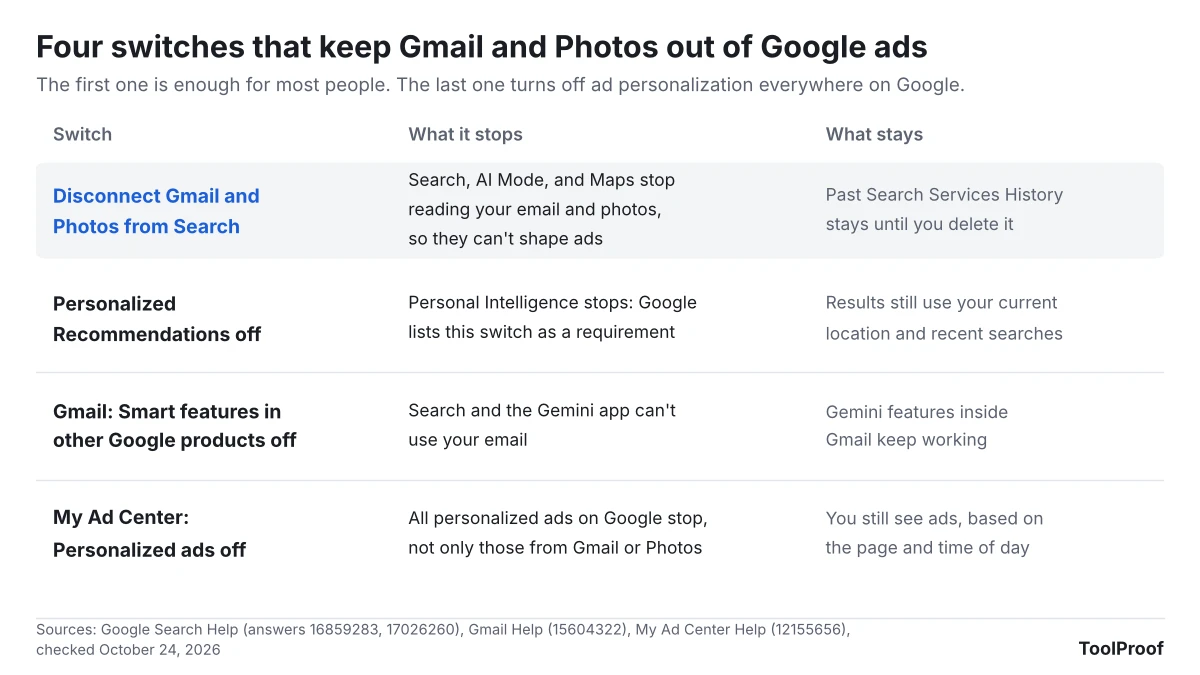
- To stop Personal Intelligence in Search entirely, go to Data & privacy > Personalization settings and turn off Personalized Recommendations in Search services. Google lists this setting as a requirement for Personal Intelligence. If you don't see these new Search settings yet, your account still uses Web & App Activity.
- To delete what Search already saved, open My Activity (opens in a new tab) and delete your Search Services History. Disconnecting alone doesn't remove it.
- Optional: in Gmail, go to Settings > See all settings > General > Manage Workspace smart feature settings and turn off Smart features in other Google products. That keeps Search and the Gemini app away from your email while Gemini inside Gmail keeps working. Our guide to turning off Gemini in Gmail explains what each of Gmail's three smart feature switches does.
- Optional: to stop all ad personalization on Google, not just this one, go to My Ad Center (opens in a new tab), select Off next to Personalized ads, and confirm. Google says ads then depend on things like the page you're on and the time of day, and your saved ad topics are deleted. Your phone number has a separate ads setting on each Google account, which our article on Android phone number verification shows how to find.
The Gemini app has its own connections, separate from Search. Our look at Gemini's new Customize menu for Connected Apps shows where to disconnect Gmail there, and our guide to turning off AI in Chrome, Gmail, Word and more covers the AI switches in other Google products.
Our take
Leave Gmail and Photos disconnected from Search unless you use Personal Intelligence often enough to accept that your inbox now helps sell you things.
The facts behind that: for nine years Google's line was that Gmail content stays out of ads, and the policy said so without conditions as recently as October 1. The new wording turns that into a default you can give up by connecting, and Google's own FAQ only promises ads won't be based "directly" on your inbox, while summaries and inferences from it can be used. Connecting also opens your email to every Search service at once, to AI training, and to human reviewers. That is a lot to accept for better restaurant suggestions in AI Mode.
The other side: this is opt-in, Personal Intelligence is genuinely useful for questions like "when does my flight leave," and an ad informed by a hotel booking may be more relevant than one based on a single search. Google also keeps sensitive categories out and doesn't give advertisers your messages. If you already rely on AI Mode with your email, turning off personalized ads in My Ad Center keeps the feature while removing the ad side.
What to watch next
- Ads in AI Mode: Google is testing ads for connected users, according to Search Engine Land. We'll update this article if Google announces where they appear or adds a separate ads switch for connected data
- More services: Google's help page says other Workspace apps are "coming soon" to Search, and the policy already names Drive. Our article on Gemini Personal Intelligence in Android Auto covers how the same data reaches Gemini in the car, and our look at Chrome enhanced autofill and Gmail covers how Gemini in Chrome started filling web forms from Gmail on October 28, 2026
- Settings rollout: Google says Search Services History and Personalized Recommendations will replace Web & App Activity for Search over the next few months
- Gemini chats: Google's Gemini privacy page says that if Gemini chats start being used for ads, it "will clearly communicate it"
How we checked
- Privacy policy versions: on October 24, 2026 we downloaded Google's current Privacy Policy (effective October 16, 2026) and the archived April 2, May 26, and October 1, 2026 versions from policies.google.com, and extracted the ads sentences from each. The three earlier versions have the same no-Gmail-ads sentence and don't mention Personal Intelligence
- Google pages (opened October 24, 2026): the 2017 Gmail blog post with its October 16, 2026 update; Google Search Help pages on connecting content apps and Personal Intelligence (opens in a new tab), the new Search services settings (opens in a new tab), and Personalized Recommendations (opens in a new tab); My Ad Center Help on personalized ads (opens in a new tab); and the Gemini Apps Privacy Hub
- Country count: we counted the entries in the help page's "Supported countries & territories" list
- Not checked: we couldn't open the settings screens without a Google account, and the AI Mode ad test comes from a news report, not a Google announcement