Android Phone Number Verification Adds Your Number to Every Google Account
Android's phone number verification is on by default and adds your number to every Google account on your phone. We read Google's help pages and list each fix.
- Published
- Reading time
- 8 min
- Category
- News & Analysis

If you're signed in to more than one Google account on an Android phone, your phone number has probably been added to all of them. Google's Android help page says phone number verification is on by default and adds the phone's verified numbers to every Google account signed in on the device, including accounts and numbers you add later. You can turn it off in your phone's Settings app, but that only stops new links. Removing the number from accounts that already have it is a separate step, one account at a time.
On October 24, 2026, we read Google's Android help page on phone number verification and three Google Account help pages on phone numbers, sign-in and recovery, and compared what they say. They don't describe the linking the same way, and one of them documents a per-number switch that lets your phone number be used for ads. We don't have an Android phone or a Google account in our test setup, so the steps below come from Google's help pages, not our own screens.
What happened
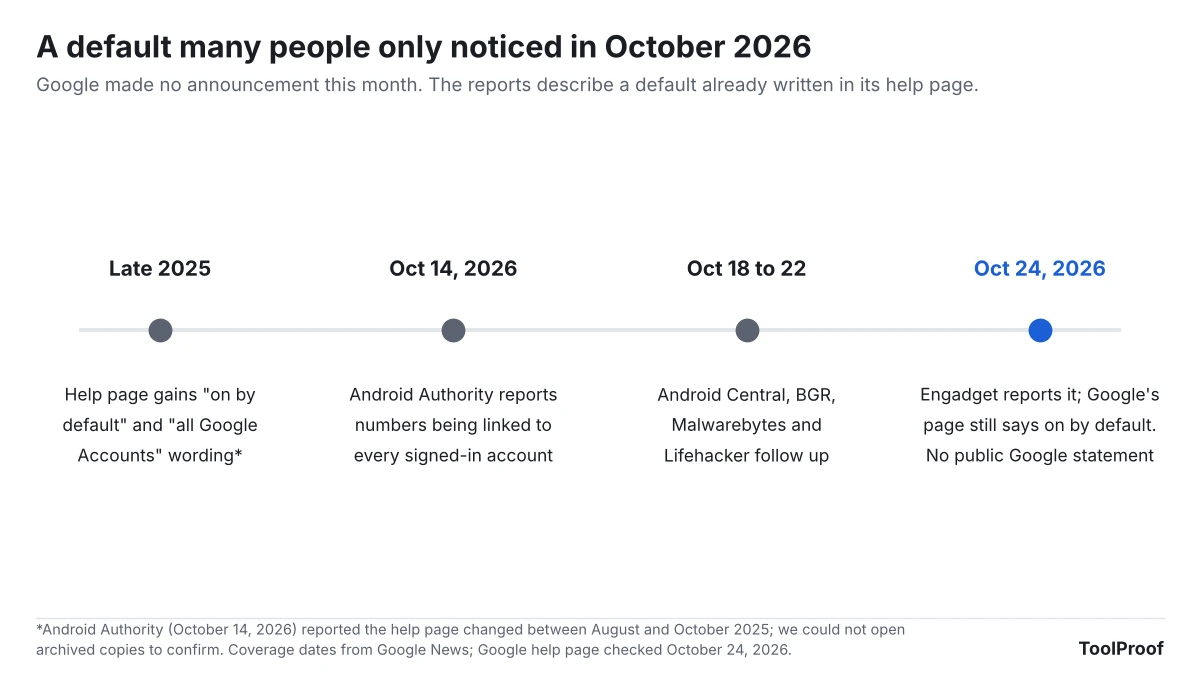
Android Authority reported on October 14, 2026 that Android users were getting emails saying their phone number had been verified, then finding that number on secondary, work and throwaway Google accounts on the same phone. Android Central, BGR, Malwarebytes, Lifehacker and, on October 24, Engadget followed.
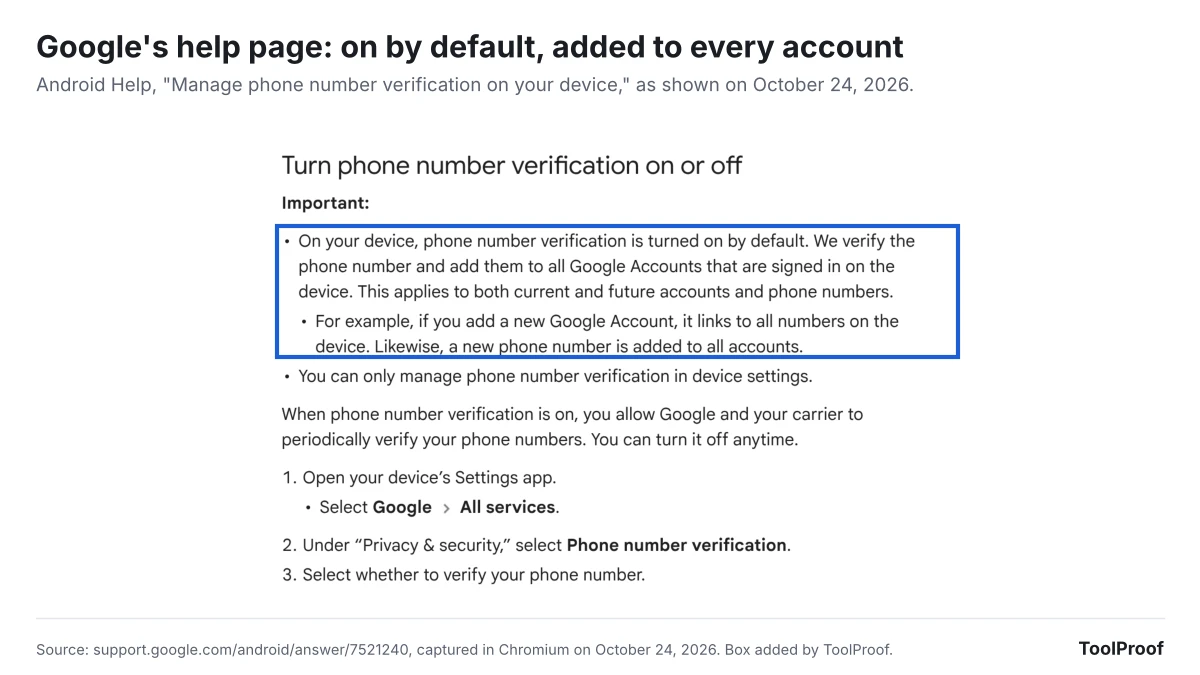
The behavior is written in Google's own help page, Manage phone number verification on your device (opens in a new tab): "On your device, phone number verification is turned on by default. We verify the phone number and add them to all Google Accounts that are signed in on the device. This applies to both current and future accounts and phone numbers." Google's example: a new account links to every number on the phone, and a new number is added to every account.
The default isn't new this month. Android Authority reported that Google added this wording to the help page between August and October 2025, and Kaspersky wrote in July 2026 that verification became widely visible after a September 2025 Google system update. As of October 24, 2026, we found no public statement from Google about the reports. Android Authority said it had asked Google for comment.
Who is affected
The setting applies to Android phones only. Google's page sits in Android Help and says phone number verification can only be managed in the device's settings.
| Your setup | What Google's help page means for you |
|---|---|
| One Google account on the phone | The phone's number is verified and added to that one account |
| A second personal account, such as a separate Gmail address | The same number is added to every account signed in, including ones you kept apart on purpose |
| A work or school account on your personal phone | Google's page doesn't exclude them, and Android Authority reported work accounts getting the number |
| Two SIMs or an eSIM plus a SIM | Each verified number is added to each account |
| Someone else's account signed in on your phone | Google's wording covers "all Google Accounts that are signed in on the device," not only your own |
| iPhone | Not covered: Google's page describes Android devices |
What changes for you
Your accounts are no longer separated by phone number. Google's own page on signing in with your phone number (opens in a new tab) tells you to use a number that "Belongs only to you" and that "You don't use on another Google Account to sign in." Automatic verification puts that one number on every account signed in on the phone.
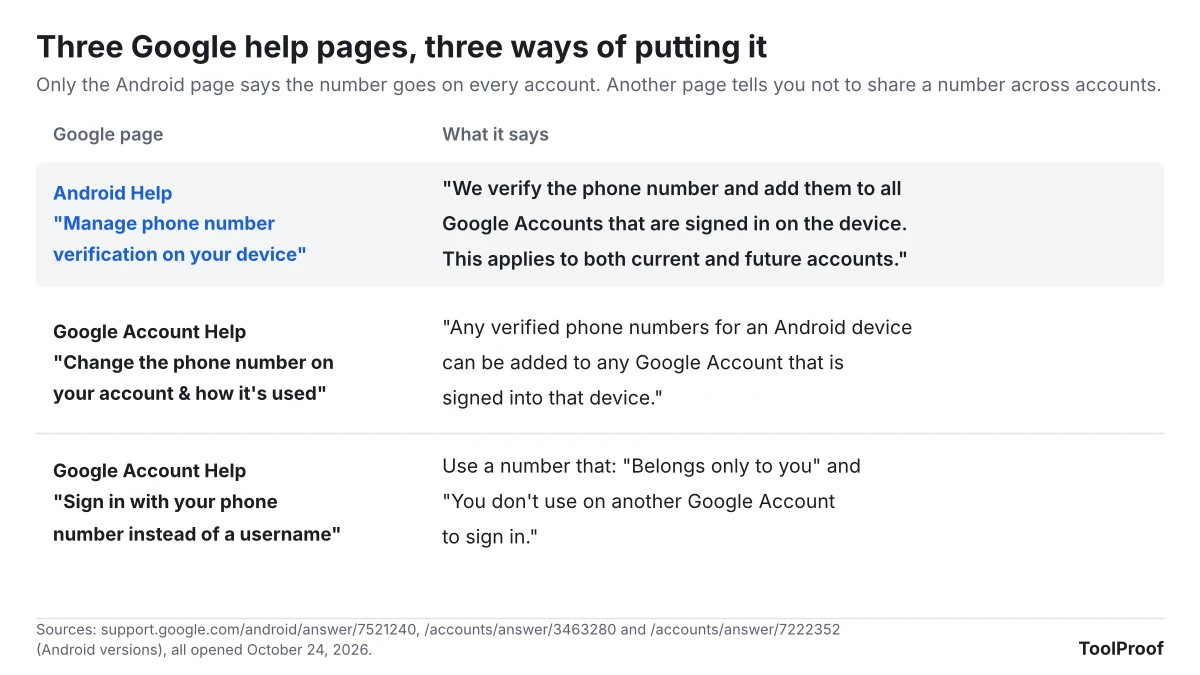
Google's pages don't describe the linking the same way. The Android page says numbers are added to all accounts. Google Account Help on how phone numbers are used (opens in a new tab) says verified numbers "can be added to any Google Account" on the device, and describes giving Google your number when you set up an account as a choice: "you can let Google know your phone's number."
Your number can be used for ads. Each phone number on a Google account has a Better ads and Google services setting. Google says it "lets your phone number to be used across Google services to show you ads more relevant to you," and when it's on, Across Google appears next to Usage for that number. Google's pages don't say whether numbers added by automatic verification start with this setting on, so check each account.
A replacement phone can find all your accounts. Google's sign-in page says that when you set up a new Android phone, Google will "attempt to identify the Google Accounts associated with the phone number" so you can sign in without typing your email. With one number on every account, that list would likely include all of them, although Google still asks for approval from another signed-in device or your old phone's screen lock.
Verification keeps running. Google and your carrier "will try to periodically reverify" your numbers, and "Carrier charges may apply."
What to do now
If you use only one Google account on your phone, you can leave verification on. Google's page says it helps you sign in with your number, get back into your account, use emergency location, find or lock a lost phone, receive RCS chats, and use Quick Share.
If you keep accounts apart, follow these steps:
- Open your phone's Settings app and tap Google > All services. On some phones the Google entry has a longer name, such as Google services and preferences, Android Authority reported.
- Under Privacy & security, tap Phone number verification and turn automatic verification off. Android Authority reported the switch is labeled Verify phone numbers automatically.
- Go back to Settings > Google, select the account that shouldn't have your number at the top, then tap Manage your Google Account > Personal info > Phone.
- Before you remove the number, open Security & sign-in and make sure the account has a recovery email. Google's recovery options page (opens in a new tab) says recovery info is how you get back in if you forget your password or get locked out.
- Back on the Phone page, select the number and tap Delete > Remove number. Repeat steps 3 to 5 for every account where you don't want it.
- For accounts that keep the number, open the same Phone page, select the number and turn off Better ads and Google services if you don't want it used for ads.
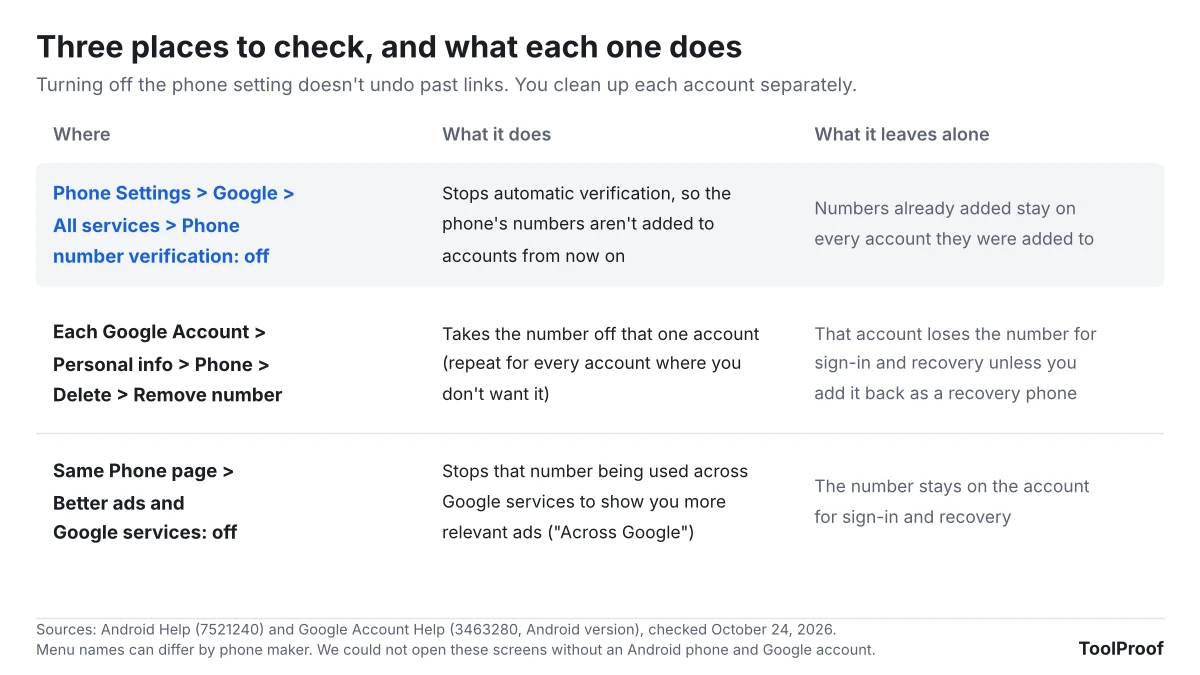
Google also documents a middle option: remove the number, then add it back only as a Recovery phone under Security & sign-in. That stops the "Across Google" use but keeps the account tied to your number. If the number won't come off an account, our guide to removing a phone number from your Google account covers the recovery phone, 2-Step Verification and the other places it can stay.
Android Authority reported that some Reddit users saw the verification switch turn itself back on, though Android Authority couldn't reproduce it. Check the setting again after a system update.
The phone number isn't the only Google default worth checking. Our look at Google's privacy policy change on Gmail and Photos ads covers a separate switch that keeps your inbox out of ads, and our guide to turning off AI in Chrome, Gmail, Word and more shows where Google's AI settings live.
Our take
If you keep more than one Google account on your Android phone, turn automatic verification off and remove the number from every account that shouldn't have it. Google should make this a choice you make for each account, at the moment you add it.
The facts behind that: a second account usually exists to stay apart from the main one. Google's own sign-in help tells you not to reuse a sign-in number across accounts, yet its Android default puts one number on every account without asking, including accounts added later. Turning the switch off doesn't undo past links, so the cleanup falls on you, account by account.
The other side: a verified number is how many people get back into an account after losing a password, and Google ties RCS chats, Quick Share and emergency location to it. For the many people with one account, the default is likely a net help. Google's page also lists what verification supports but not what stops working when you turn it off, so switching it off on a single-account phone could cost features Google doesn't spell out.
What to watch next
- A response from Google: Android Authority asked Google for comment. We'll update this article if Google changes the default, adds a prompt for each account, or explains what turning verification off disables
- The help pages: we'll recheck the Android Help and Google Account Help pages, which currently describe the linking differently
- The switch staying off: we'll add any confirmed reports of it turning back on after updates
How we checked
- Google pages (opened October 24, 2026): Android Help, Manage phone number verification on your device (opens in a new tab), which we also captured in Chromium; Google Account Help, Change the phone number on your account & how it's used (opens in a new tab), Sign in with your phone number instead of a username (opens in a new tab) and Set up recovery options (opens in a new tab), using the Android versions where Google offers them
- Reports: Android Authority (October 14, 2026) for the 2025 help page change, the emails, the switch name and the Reddit reports; Kaspersky (July 22, 2026) for the September 2025 update; Google News for coverage dates
- Not checked: we couldn't open the settings screens without an Android phone and a Google account, and the Internet Archive didn't load from our test setup, so we couldn't confirm from archived copies when Google changed its help page