Chrome Enhanced Autofill Now Pulls Details From Your Gmail
Chrome enhanced autofill now fills forms with order, tracking and flight details from Gmail for some US users. We opened Chrome 156 to map the switches.
- Published
- Reading time
- 8 min
- Category
- News & Analysis

Starting October 28, 2026, Chrome enhanced autofill can fill online forms with details it finds in your Gmail, such as order numbers, package tracking and flight bookings. It only reaches your inbox if you're in the US, use Gemini in Chrome and turned on Gemini's Personal Intelligence. If that's you and you'd rather keep your email out of web forms, turn off Find and fill with Gemini under Settings > Autofill and passwords > Enhanced autofill.
We ran Google Chrome 156.0.8078.73, the current stable version, on October 28, 2026, and read the interface text built into the browser alongside Google's announcement and help pages. We have no Google account in our test setup, so we saw Chrome's autofill settings only while signed out.
What happened
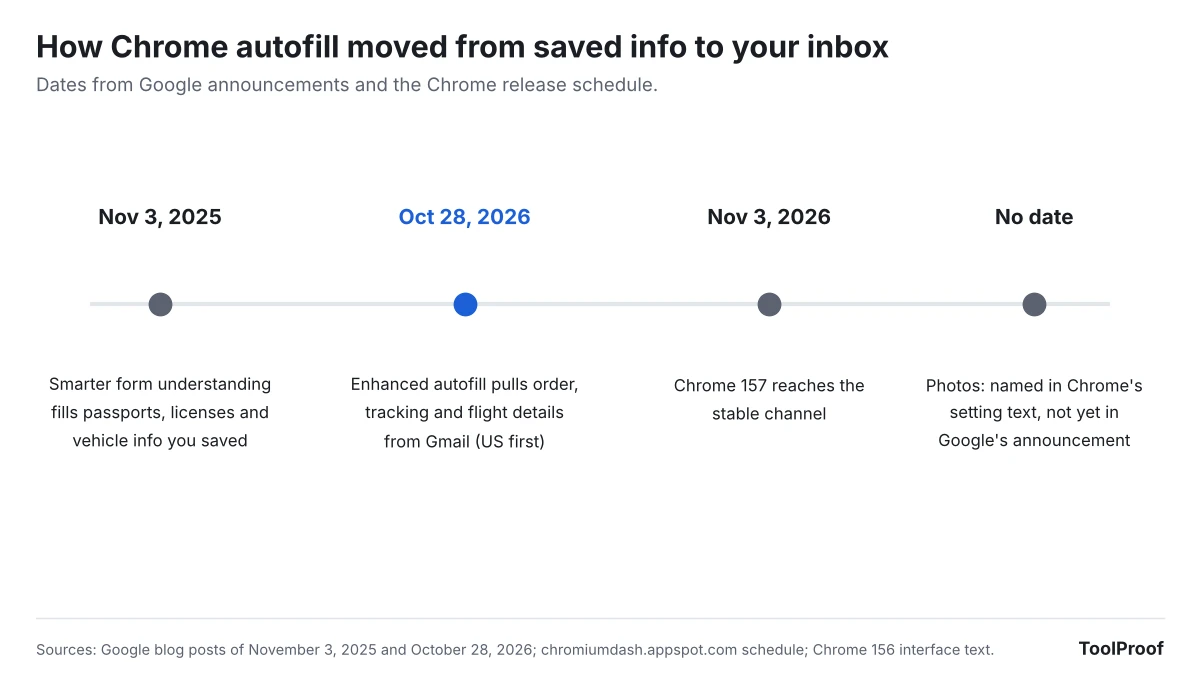
Google announced in a Chrome blog post on October 28, 2026 (opens in a new tab) that enhanced autofill "can automatically suggest information pulled directly from Gmail as you fill out online forms." It uses Gemini with Personal Intelligence to find details like order numbers, tracking information and flight bookings. The rollout starts in the US on desktop, Android and iOS, for Gemini in Chrome users who have Personal Intelligence turned on.
Enhanced autofill itself isn't new. On November 3, 2025 (opens in a new tab), Chrome started filling passport numbers, driver's license numbers and vehicle info that you had saved, for desktop users with smarter form understanding turned on. The October change is the first time it fills forms from a Google app instead of from info you saved in Chrome.
Chrome's help page, Fill out forms automatically in Chrome (opens in a new tab), says Gmail suggestions appear in the autofill dropdown with the Gemini spark icon, controlled by a switch named Find and fill with Gemini.
Who is affected
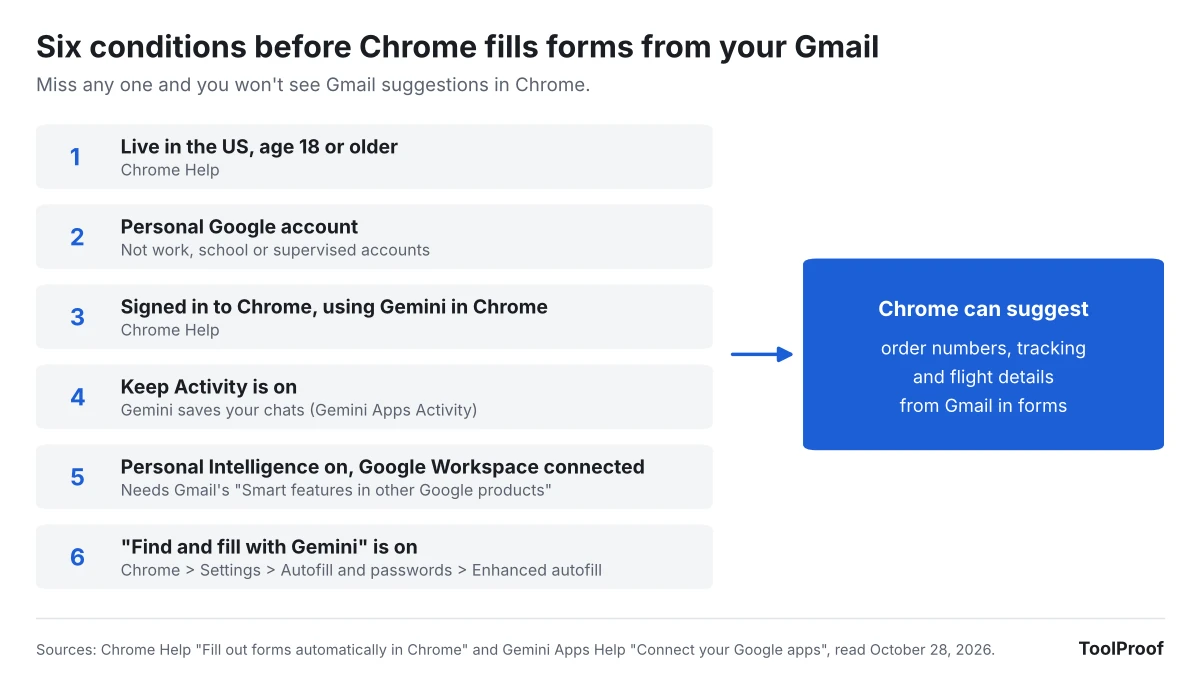
You'll see Gmail suggestions in Chrome only if you meet every condition on two Google help pages. Chrome's page names the US, age 18 or older and Personal Intelligence. Gemini's Personal Intelligence page (opens in a new tab) adds a personal Google account, the Keep Activity setting and, for Gmail, a Gmail setting called Smart features in other Google products.
| If you... | What happens |
|---|---|
| Live in the US, use Gemini in Chrome and turned on Personal Intelligence | Gmail suggestions start appearing as the rollout reaches you |
| Never turned on Personal Intelligence | No Gmail suggestions. Regular autofill works as before |
| Turned off Keep Activity in Gemini | Personal Intelligence isn't available, so no Gmail suggestions |
| Turned off Gmail's Smart features in other Google products | Gemini can't connect to Gmail, Calendar or Drive |
| Use a work, school or supervised Google account | Not eligible for Personal Intelligence |
| Live outside the US | Not available yet. Personal Intelligence itself isn't offered in the EEA, Nigeria, Switzerland or the UK |
| Aren't signed in to Chrome | Google says autofill needs a signed-in Google account |
Our guide to turning off Gemini in Gmail explains what Gmail's three smart feature switches each control, including the one Gemini needs to read your email.
What changes for you
For eligible users, Chrome can now fill fields you would normally copy out of an email. Chrome 156's interface text includes sample requests such as "running shoes order number" and "confirmation code for LAX flight." In the Linux version we checked, a shortcut setting reads "Press Ctrl twice for enhanced autofill," which opens that search inside any form without switching tabs.
Three details from Google's help page matter once suggestions show up:
- You can see the source. Hover over a Gemini suggestion on a computer, or long-press the suggestion chip above the keyboard on a phone and tap View sources, to get a link that opens the original email in a new tab.
- You can't correct it in Chrome. Google says info pulled from Gmail "can't be edited in Chrome."
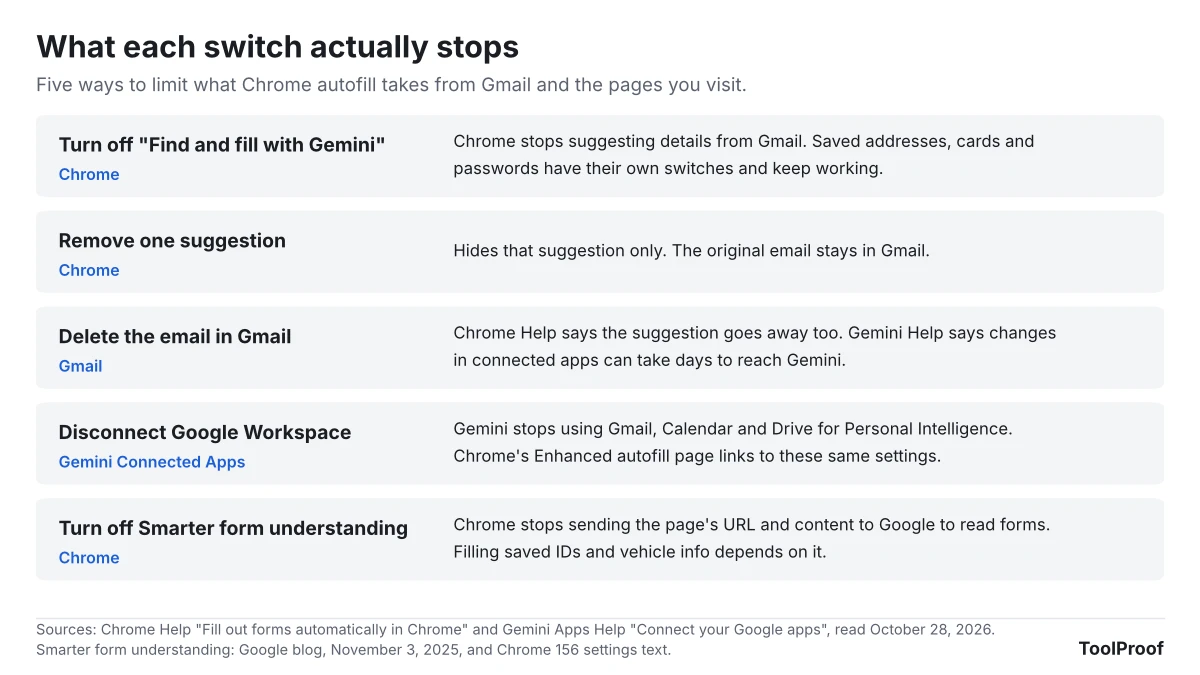
- Removing isn't deleting. Removing a suggestion doesn't delete the email, but deleting the email removes the suggestion. Gemini's help page separately says changes to data in a connected app may not reach Gemini "until days later."
Chrome 156's notice for this feature says, "Your requests, page titles, and URLs may be reviewed to improve enhanced autofill." A version for browsers an organization manages says instead, "Your content will not be used to improve AI." Google's Chrome Enterprise page on enhanced autofill (opens in a new tab) lists the consumer default as "Allow feature and improve AI models," with data that "can also be read by human reviewers." Google's announcement says sensitive data is encrypted.
Photos may come next. Chrome 156 already describes the switch as "Autofill info from apps such as Gmail and Photos," while Google's announcement and help page mention only Gmail.
What to do now
If you'd rather Chrome didn't search your email when you fill out forms, these steps follow Google's Chrome autofill help page (opens in a new tab) and Personal Intelligence help page (opens in a new tab).
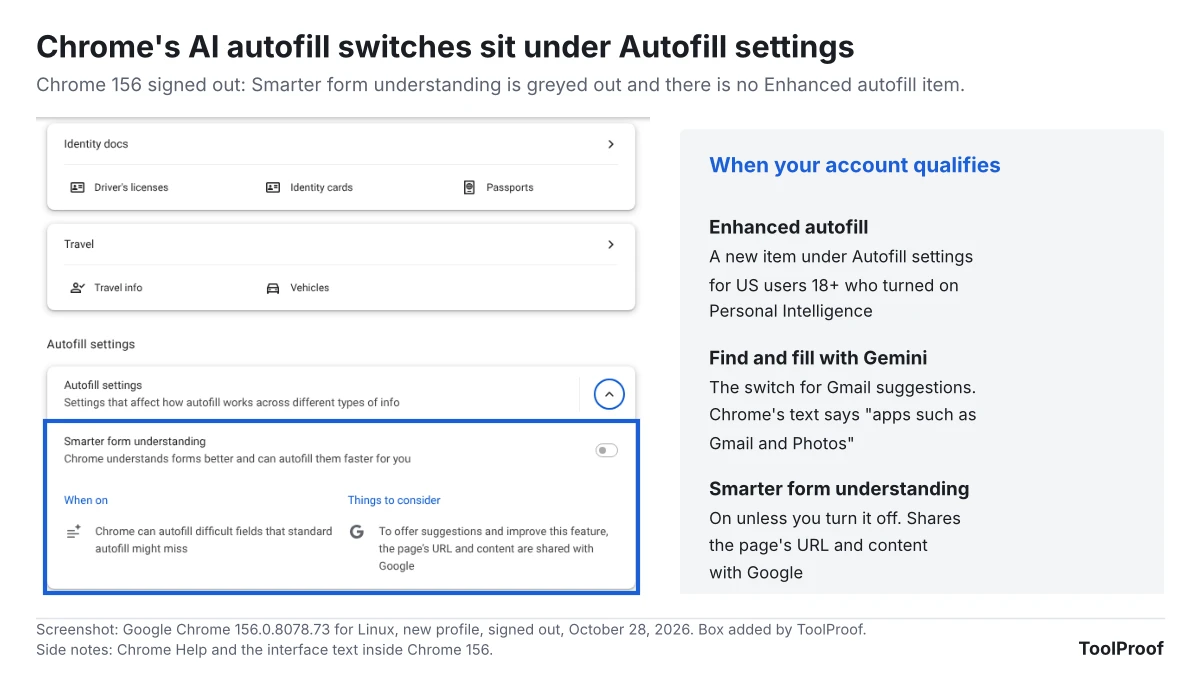
- On a computer: open Chrome, click More (the three dots) > Settings > Autofill and passwords. Under Autofill settings, select Enhanced autofill and turn off Find and fill with Gemini.
- On Android: open Chrome, tap More > Settings > Autofill and passwords. Under Autofill settings, tap Enhanced autofill and turn off Find and fill with Gemini.
- On iPhone or iPad: open Chrome, tap More > Settings > Autofill and passwords > Autofill settings > Enhanced autofill, and turn off Find and fill with Gemini.
- To hide one wrong or outdated suggestion: on a computer, open the dropdown in the form field, hover over the Gemini suggestion and select Remove from Chrome. On Android, long-press the suggestion chip above the keyboard and tap Remove suggestion. On iPhone, long-press it and tap Remove. Delete the email in Gmail if you want the details gone from both.
- To keep Gmail away from Gemini everywhere: in the Gemini app, tap Menu, then your profile picture > Personal Intelligence > Connected Apps (on gemini.google.com: Menu > Settings & help > Personal Intelligence > Connected Apps), and turn off Google Workspace. That also stops Gemini from using Gmail, Calendar and Drive for Personal Intelligence in chats. Our look at Gemini's Customize menu for Connected Apps covers the other app connections.
- Optional: in the same Autofill settings list, turn off Smarter form understanding if you don't want Chrome to send the page's URL and content to Google to understand forms. Google's help page says it is on unless you turn it off, and filling saved IDs and vehicle info depends on it.
Turning off Keep Activity ends Personal Intelligence entirely, with side effects our guide to turning off Gemini Apps Activity lists. These steps leave ordinary autofill on; our guide to Chrome autofill settings covers the switches for saved addresses, cards and passwords and how to delete what Chrome saved. To remove Gemini from Chrome altogether, see our guide to turning off AI in Chrome, and for AI switches in other apps, our roundup of how to turn off AI in Chrome, Gmail, Word and more.
Our take
Leave Find and fill with Gemini off unless you regularly copy order numbers or flight details into web forms. For most people, the convenience is small next to what the feature sends.
The facts behind that: Chrome's own text says your requests, page titles and URLs are sent to Google and may be reviewed. The controls are also spread out: the Gmail switch is in Chrome's Enhanced autofill page, the Gmail connection in Gemini's Connected Apps, Keep Activity in Gemini's activity settings, and Smarter form understanding, on by default, is a separate Chrome switch. Chrome's Enhanced autofill page links to Connected Apps, but no single page shows which of these are on for you. Forms that ask for an order number are a small part of most people's browsing, while the review notice covers every request.
The other side: this only reaches people who already opted in to Personal Intelligence, so Chrome isn't reading an inbox the user hasn't opened to Gemini. Showing the source email and letting you remove a suggestion is more transparency than ordinary autofill offers. If you rebook flights or track packages often, skipping the trip to your inbox saves real time, and Chrome's text says the info you autofill is never seen by anyone.
What to watch next
- Google Photos: we'll update this article if Google adds Photos or other connected apps
- More countries: Google says the rollout is "beginning" in the US and hasn't named other countries. Connecting Gmail to Google Search is a separate switch, which our article on Google using Gmail and Photos for ads explains
- Chrome 157 on November 3, 2026: we'll recheck the autofill settings and interface text in the next stable release
- Default setting: Google doesn't say whether Find and fill with Gemini starts on or off. Chrome 156 includes a "Now you can find and fill info from Gmail and more" notice with Manage settings and OK buttons
FAQ
Why is Chrome enhanced autofill greyed out?
You're probably signed out of Chrome, or an organization manages your browser. In our test, signed-out Chrome 156 showed Smarter form understanding, Save and fill identity docs, and Save and fill travel info greyed out. Google's help page says autofill needs you to be signed in to Chrome, and Google's admin page says organizations control enhanced autofill from the Google Admin console.
Why is enhanced autofill missing from Chrome settings?
The Enhanced autofill item appears only for eligible accounts. In our signed-out copy of Chrome 156, the Autofill settings section had only Smarter form understanding and no Enhanced autofill item. If you're signed in, check the six conditions above, and keep in mind that Google is rolling the Gmail feature out gradually in the US.
How we checked
- Chrome: on October 28, 2026, we ran Google Chrome 156.0.8078.73 for Linux with a new profile without signing in, opened Autofill and passwords and recorded which switches appeared and whether they were on or greyed out. We read the Enhanced autofill settings, notices, sample requests and shortcut in Chrome's English language file. Our test environment's network settings make Chrome show a "managed by your organization" note, but no autofill or AI policies were set
- Google pages (opened October 28, 2026): the Chrome blog posts of October 28, 2026 (opens in a new tab) and November 3, 2025 (opens in a new tab), Chrome Help "Fill out forms automatically in Chrome" for computer, Android and iPhone, the Chrome Enterprise page on enhanced autofill, Gemini Apps Help on Personal Intelligence and Connected Apps, and Google's Chrome release schedule (opens in a new tab)
- Not checked: we couldn't sign in, so we didn't see Gmail suggestions, the Enhanced autofill page, or whether Find and fill with Gemini starts on or off. We didn't check the shortcut on Mac, Android or iPhone