Arc Browser Is Shutting Down December 22 and Moving Users to Dia
The Arc browser is shutting down December 22, 2026. What moves to Dia, why Arc's export is only a list of links, Dia's AI prices and the default to change.
- Published
- Reading time
- 9 min
- Category
- News & Analysis

The Arc browser is shutting down on December 22, 2026. On that date Arc for Mac and Windows stops working, and The Browser Company, which makes Arc, wants you to move to Dia, its AI browser. Dia's import is the only route Arc documents that brings over your passwords, history and logins. If you'd rather switch to a different browser, Arc's export gives you a list of links, not a bookmarks file, so plan to rebuild some of your setup by hand. Either way, move before December 22: after that, Arc won't open, even to reach data saved on your own computer.
On October 25, 2026, we read Arc's farewell page, 10 Arc Help Center articles updated for the shutdown, and Dia's plans, security and privacy pages. They add a December 15 deadline the announcement leaves out, and Dia's plans page lists one AI plan at two prices. Arc and Dia only run on Mac and Windows, so the steps below come from their help pages, not our own screens.
What happened
The Browser Company announced on October 22, 2026, on arc.net (opens in a new tab), that it will "sunset Arc on December 22, 2026." The company says keeping a browser secure "takes constant, dedicated work that is only increasing in the age of AI" and that its engineering and security teams will focus on Dia, which it says "was built from the ground up to meet today's security standards."
New Arc accounts stopped on October 22. Existing members can keep using Arc, and its key dates page (opens in a new tab) says Arc for Mac and Windows will keep getting "its usual basic updates and fixes" until December 22, with no new features. The latest versions, released October 22, moved Arc to Chromium 156, the engine behind the current Chrome.
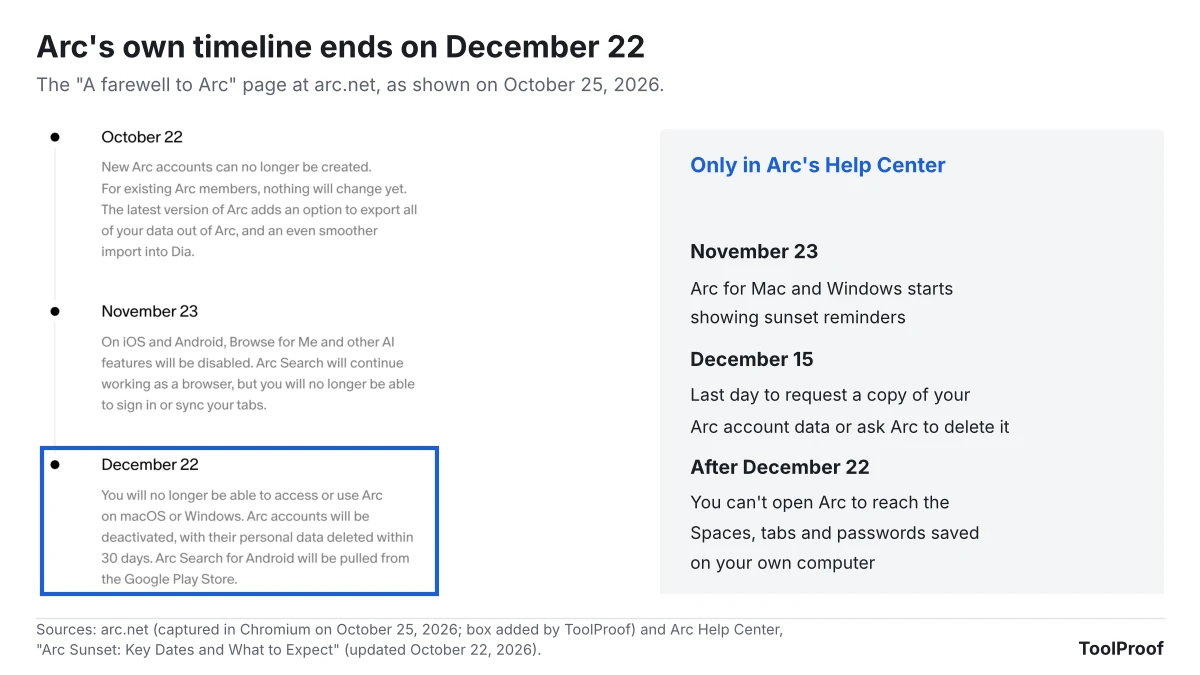
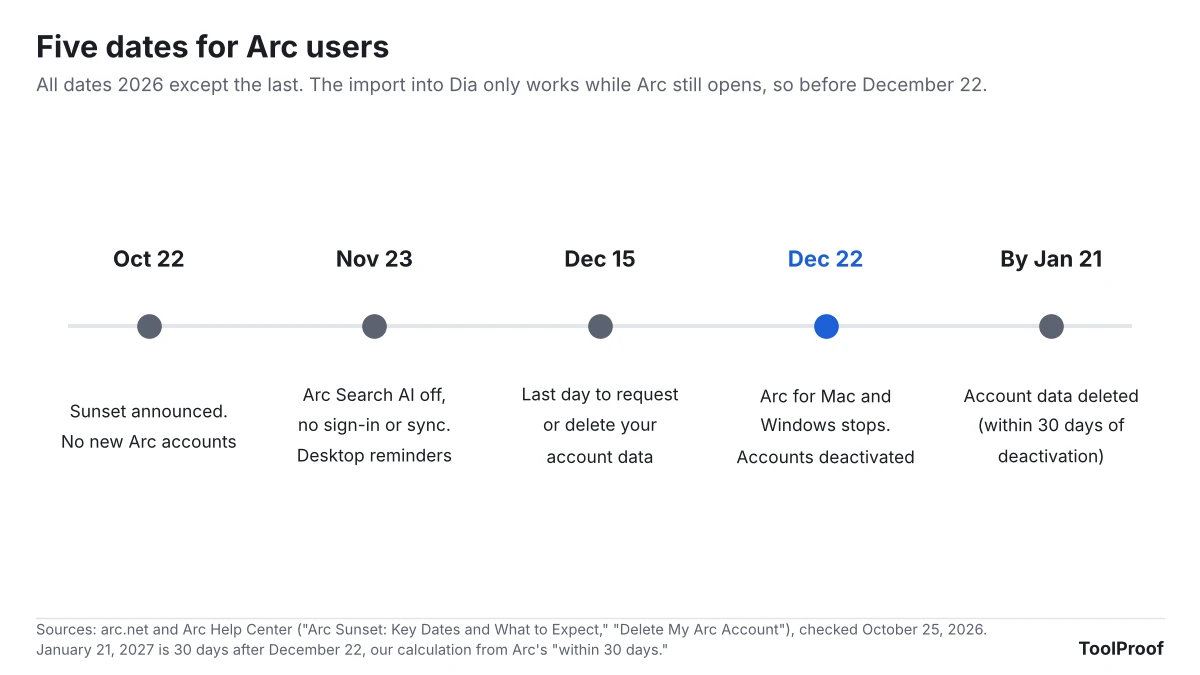
Arc's help pages spell out the rest. On November 23, Arc Search on iPhone and Android loses Browse for Me and its other AI features, along with sign-in and sync, and the desktop app starts showing sunset reminders. December 15 is the last day to ask for a copy of your Arc account data or to have it deleted. On December 22, all Arc accounts are deactivated, and Arc says it will delete personal data tied to them within 30 days.
Who is affected
Everyone with an Arc account is affected, but the dates differ by device, according to Arc's sunset FAQ (opens in a new tab) and its Arc Search page (opens in a new tab).
| You use | What happens |
|---|---|
| Arc on a Mac or Windows PC | Works with basic updates until December 22, then stops opening |
| Arc Max, Arc's AI features on desktop | Keeps working until December 22 |
| Arc Search on iPhone | AI features, sign-in and sync end November 23. The app keeps working as a basic browser |
| Arc Search on Android | Same November 23 changes, then removed from the Play Store and from your phone on December 22 |
| Easels or Boosts | Neither moves to Dia. Easels can be saved as images, Boosts can't be saved at all |
| No Arc account yet | You can't make one: sign-ups closed October 22 |
What changes for you
Dia is the only full exit. Arc's Move from Arc to Dia (opens in a new tab) page says Dia brings over your Spaces (as Profiles), Favorites, pinned tabs, folders (as pinned Tab Groups), bookmarks, history, passwords, cookies, extensions and open tabs, on Mac and Windows. Easels, Boosts and other Arc-only features stay behind, and Dia "doesn't import saved payment methods or autofill data from any browser." The import is a one-time copy, and Dia uses its own account, though you can sign up with the same email.
Arc's export is a list of links, not a bookmarks file. If you aren't moving to Dia, Arc's export page (opens in a new tab) says Arc saves a file named Arc Data Export.md with a section for each Space, listing Favorites, pinned tabs, folders and other sidebar tabs as links. "Your export is a list of links rather than a bookmarks file," the page says, so you open it in a text editor and re-add the links yourself. Chrome, for comparison, imports bookmarks from an HTML file (opens in a new tab), which this export isn't. Arc's help pages don't describe exporting passwords or history for another browser.
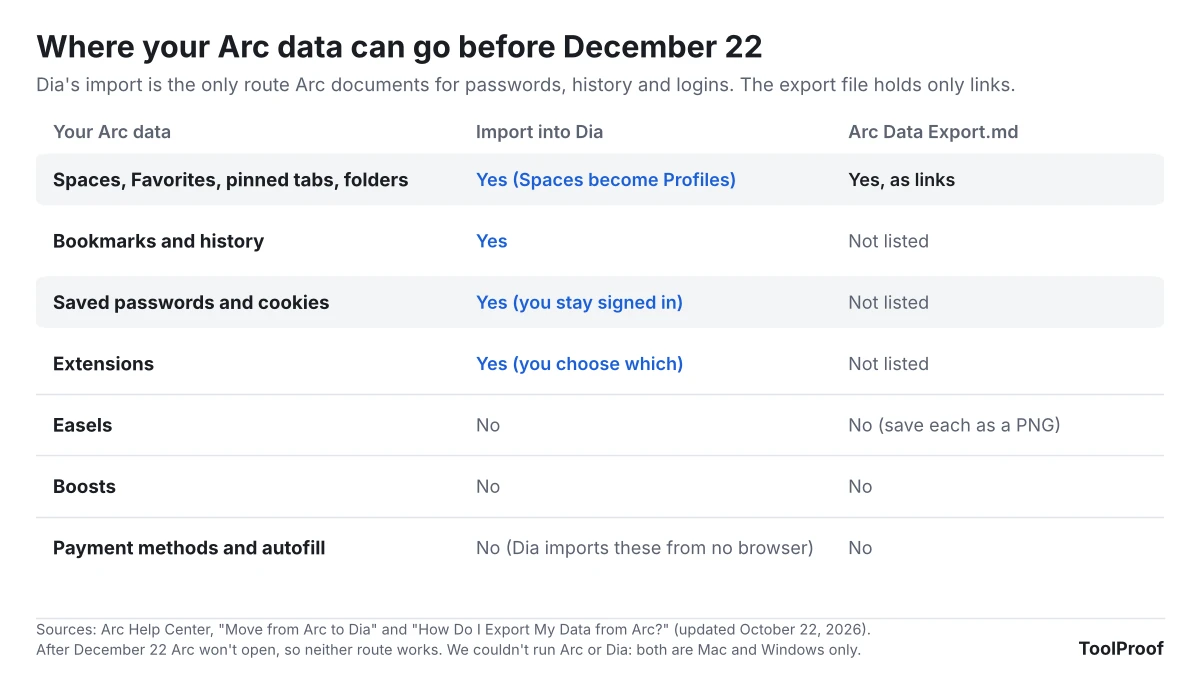
After December 22, even your own computer's copy is out of reach. Arc's key dates page says you "won't be able to open it to get to Arc data stored locally on your device." A data request before December 15 won't save it either: the copy covers account details such as your name, email address and join date, and "doesn't include browsing data stored on your device, like your history or passwords."
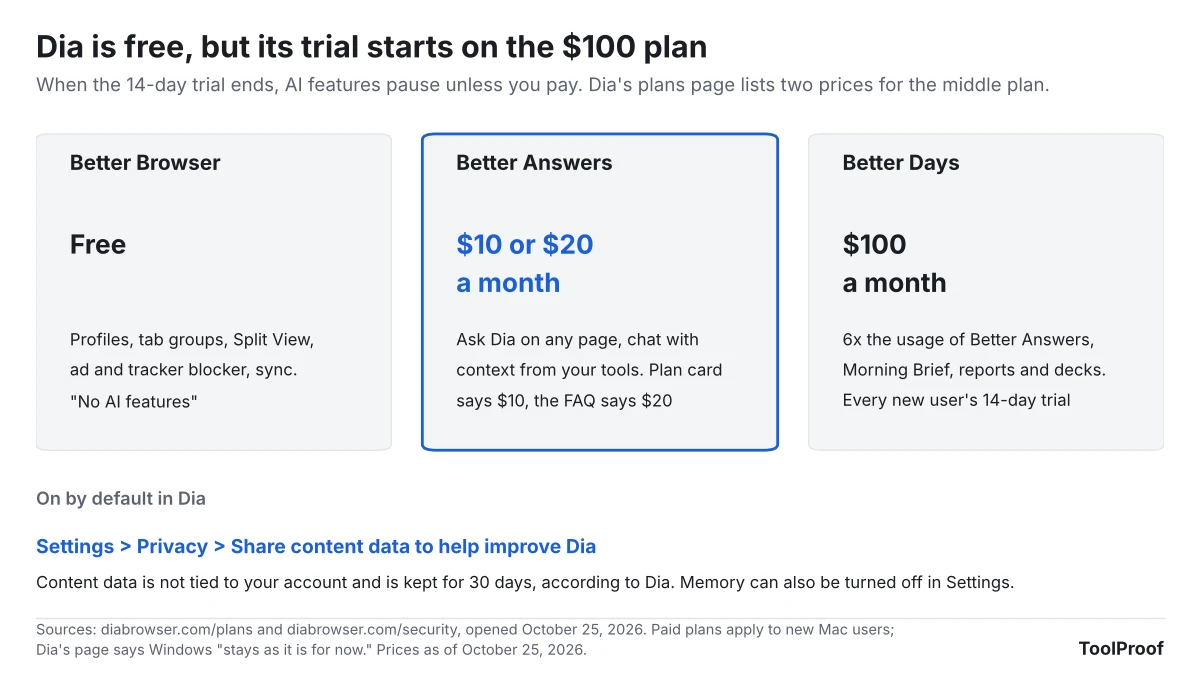
Dia is free as a browser, but its AI costs extra after a trial. Dia's plans page (opens in a new tab) describes the free Better Browser plan as having "no AI features." Every new Dia user gets a 14-day trial of Better Days, the $100-a-month plan, with no credit card required. When it ends, AI features pause unless you pay. The middle plan, Better Answers, is listed at $10 a month on its plan card and $20 a month in the same page's FAQ, as of October 25, 2026. Paid plans are starting with new Mac users, and the page says Dia on Windows "stays as it is for now."
Dia's privacy defaults aren't Arc's. Arc's privacy page (opens in a new tab) promises "We don't know which websites you visit." Dia's privacy policy (opens in a new tab) lists "the pages you visit using Dia" and your Dia Assistant chats as content data, which it may use to improve Dia "unless you opt out." Dia's security page (opens in a new tab) says history and chats stay on your device by default, AI requests go to partners such as Anthropic, OpenAI and Google that are contractually barred from training on them, and content data used to improve Dia isn't tied to your account and is deleted after 30 days. The Browser Company is part of Atlassian, which runs Dia's sign-in.
What to do now
- Pick your next browser before December 22. If you want your Spaces, passwords and logins to come along in one step, that's Dia. If you'd rather leave, skip to step 5.
- Import into Dia. Download Dia from diabrowser.com/download (opens in a new tab), and when it asks which browser to import from, select Arc, then choose which extensions to install. On Windows, quit Arc first, or Dia shows a Cookies file locked message. Keep Arc installed until the import finishes. If you already use Dia, go to Dia > Import from Another Browser… on a Mac, or open the Dia app menu and select Import from another browser… on Windows, then select Arc.
- Turn off content sharing in Dia. Go to Settings > Privacy and turn off Share content data to help improve Dia. Dia's security page says you can also turn off Memory, which lets you ask Dia about your past activity, in Dia's Settings.
- Let the trial lapse if you don't want AI. The trial doesn't need a card, and Dia's plans page says that if you haven't picked a plan when it ends, Dia keeps working as a browser and its AI features pause. You can see your usage under Settings > Usage.
- Not using Dia? Export your tabs. On a Mac, go to Arc > Settings > Advanced > Export Data. On Windows, press Ctrl + , to open Settings, then under Advanced find Export Spaces and tabs and select Export Data. Open the file in TextEdit or Notepad and add the links you want to your new browser. To grab one folder, right-click it in the sidebar and select Copy All Links.
- Move your passwords another way. Arc's help pages don't cover exporting passwords for other browsers, so before December 22 sign in to the sites that matter in your new browser and let it save each password. Passwords kept in a separate password manager app don't depend on Arc. If you're moving to Chrome, our guide to turning off AI in Chrome covers Chrome's own Gemini features. If you're moving to Firefox, our guide to turning off AI in Firefox shows the one switch that blocks its AI features.
- Save Easels as images. Open each Easel, select the Share icon in the bottom-right corner, then Share Via… to save it as a PNG.
- Export Arc Search tabs on your phone. On iPhone, tap the Tab Switcher icon, then Settings > Export Data. On Android, tap the Tab Switcher, then Settings > Storage > Export data.
- Request your account data by December 15 if you want it. Use the chat button on the Arc Help Center (opens in a new tab). You don't need to delete your account yourself: Arc deactivates every account on December 22.
Our take
The Browser Company is giving Arc users two months' notice and a one-click move to Dia, but only a list of links for anyone moving to another browser. Before December 22, it should add a standard export for bookmarks and passwords, the kind Chrome already offers as an HTML bookmarks file.
The facts behind that: Arc is built on Chromium, the same engine as Chrome, and Arc's pages document a full import into Dia that carries passwords, history and cookies. For every other browser, they document a Markdown list of links. Arc's privacy page also promised that the company doesn't know which sites you visit, while Dia counts the pages you visit as content data and starts with content sharing switched on. Steering users into different privacy defaults, with a weak exit for everyone else, makes the move feel less like a choice.
The other side: most people likely chose Arc for the sidebar, Spaces and pinned tabs, and Dia keeps those on a free plan with no AI features. Dia also publishes more detail than many browsers about where AI data goes. For Arc users who like the same team's design, importing into Dia and turning content sharing off is a reasonable path. If you're still deciding, our guide to turning off AI in Chrome, Gmail, Word and more shows which AI defaults other apps turn on.
What to watch next
- November 23: Arc Search loses its AI features, sign-in and sync, and desktop Arc starts showing sunset reminders
- December 15: the last day to request a copy of your Arc account data or ask for its deletion
- December 22: Arc stops working. We'll update this article if The Browser Company changes the date or adds a bookmarks or passwords export
- Dia's pricing: we'll update when Dia's plans page shows one price for Better Answers, or when paid plans reach Windows
How we checked
- Arc pages (opened October 25, 2026): the arc.net (opens in a new tab) farewell page, which we also captured in Chromium, and Arc Help Center articles on key dates (opens in a new tab), the sunset FAQ (opens in a new tab), moving to Dia (opens in a new tab), exporting data (opens in a new tab), deleting your account (opens in a new tab), Arc Search (opens in a new tab), privacy (opens in a new tab) and the Mac and Windows release notes, all last updated October 22, 2026
- Dia pages: plans (opens in a new tab), security (opens in a new tab), the privacy policy (opens in a new tab) (effective April 9, 2026) and the latest release notes
- Other: Google's Chrome Help page on importing bookmarks (opens in a new tab), and Google News for coverage dates
- Not checked: Arc and Dia only run on Mac and Windows, so we couldn't install them in our Linux test setup. Menu names come from Arc's and Dia's pages. We also didn't confirm whether other browsers can import directly from Arc, because we couldn't find that in their official help pages