Windows 11 Starts Letting You Customize the Right-Click Menu
Microsoft's optional KB5127936 update starts rolling out a faster Windows 11 right-click menu you can customize. Which PCs get it, how to install it, and when.
- Published
- Reading time
- 7 min
- Category
- News & Analysis

Windows 11 now lets you customize the right-click menu in File Explorer: switch off commands you never use, add Print, and show Cut, Copy and Paste as text instead of a row of icons. Microsoft began rolling it out on October 28, 2026, in the optional update KB5127936 for Windows 11 versions 25H2 and 26H2. The menu turns on gradually, so installing that update doesn't guarantee you'll see it yet, and most people can simply wait for the regular security update on November 10.
PCs still on version 24H2 or 23H2 Home or Pro won't get the new menu at all until they move to a newer version, and Windows 10 won't get it. We read Microsoft's release notes for KB5127936, its Windows 11 release information and message center, and the Windows Insider posts that introduced the menu on October 29, 2026. We don't have a Windows 11 PC in our test setup, so the menu details below follow Microsoft's descriptions.
What happened
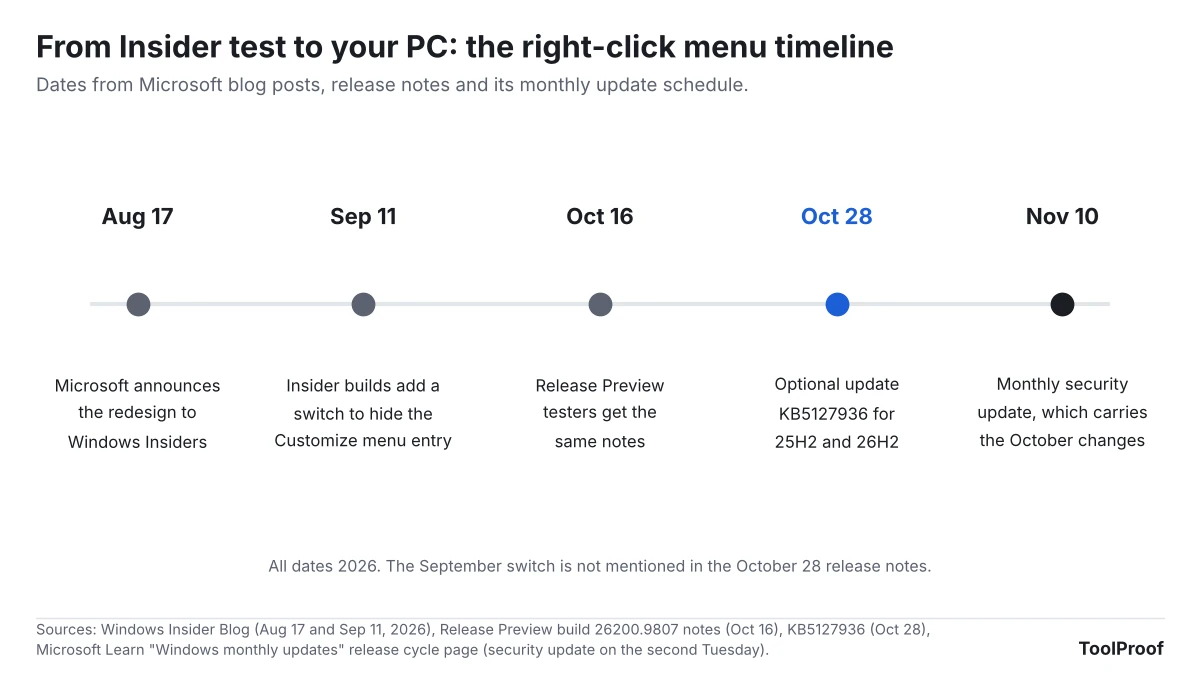
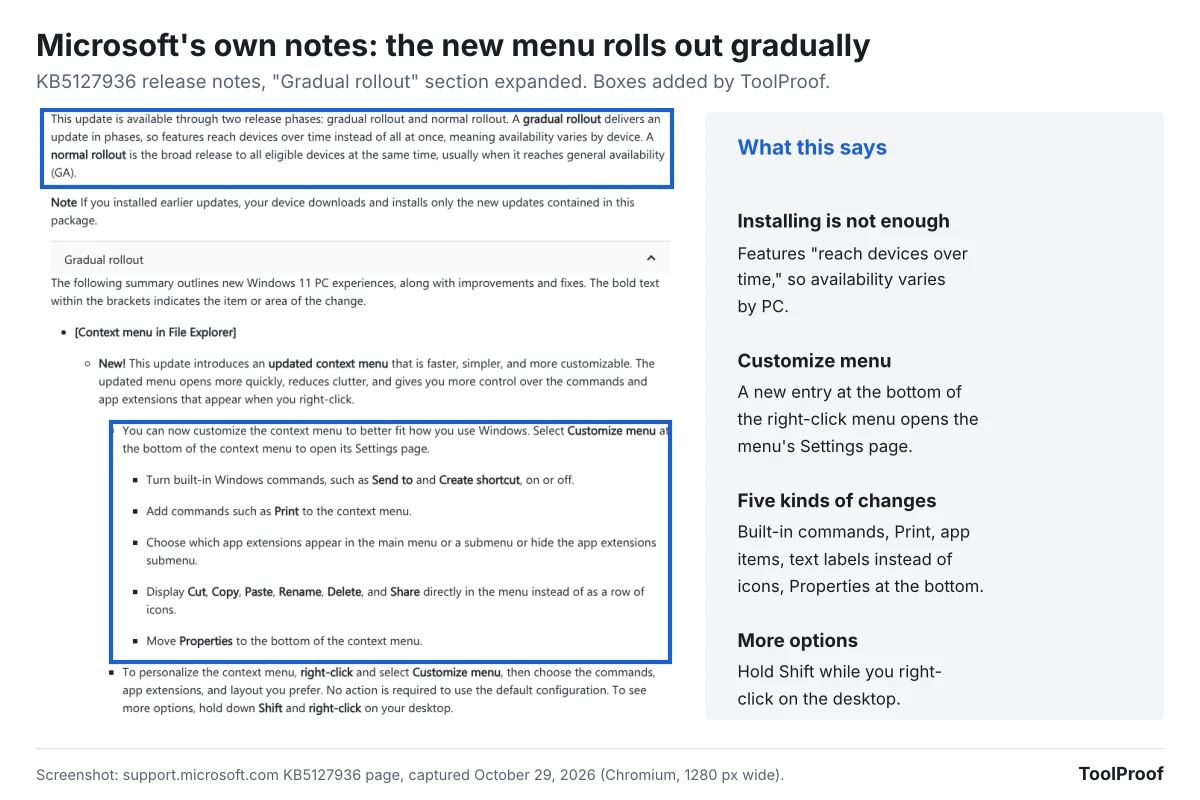
Microsoft released KB5127936 on October 28, 2026, as the October "non-security preview" update for Windows 11 versions 25H2 (build 26200.9818) and 26H2 (build 26300.9818). Its Windows message center (opens in a new tab) lists the File Explorer context menu first among the highlights, describing it as "faster and easier to customize." The KB5127936 release notes (opens in a new tab) put the menu under "Gradual rollout," which Microsoft defines as features that "reach devices over time instead of all at once, meaning availability varies by device."
The menu is not new to testers. Microsoft announced the redesign to Windows Insiders on August 17, 2026 (opens in a new tab), saying the Windows 11 menu "became cluttered and sluggish" over time. The same release notes reached the Release Preview test channel on October 16, 2026.
Who is affected
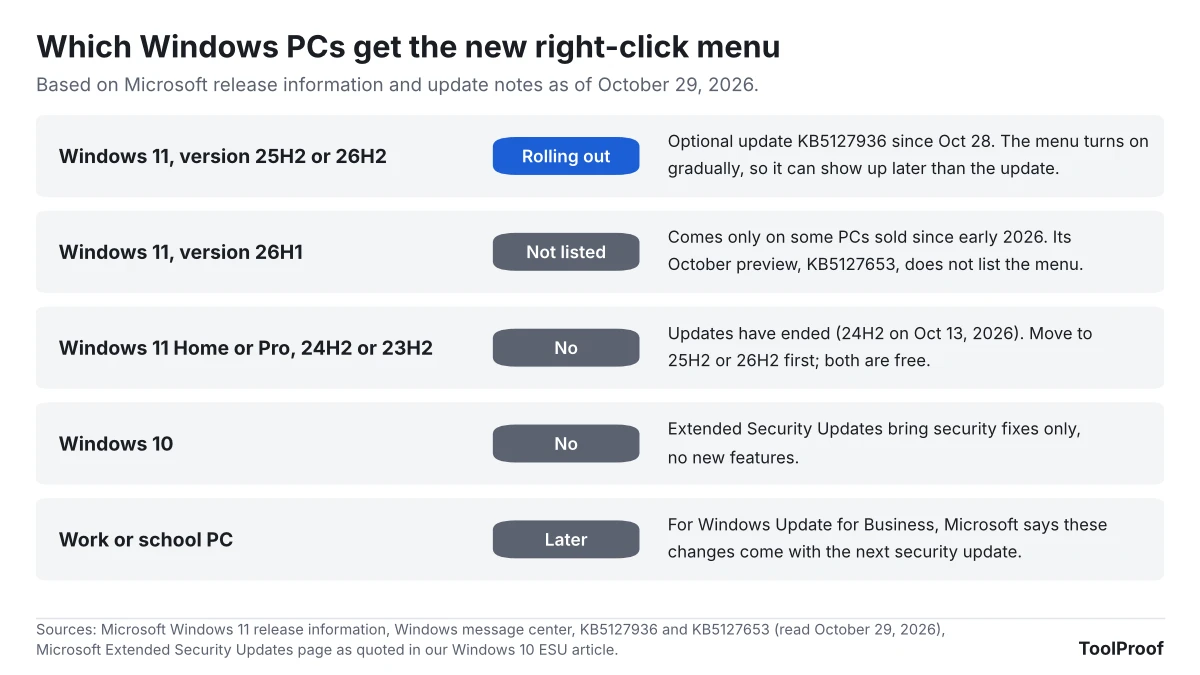
Only Windows 11 versions 25H2 and 26H2 get the new right-click menu in this update. Microsoft's Windows 11 release information (opens in a new tab) page shows which versions received the October 28 update.
| Your PC | New menu? | Why |
|---|---|---|
| Windows 11, version 25H2 or 26H2 | Rolling out | KB5127936 includes it, and it turns on gradually |
| Windows 11, version 26H1 | Not in this update | Comes only on some PCs sold since early 2026. Its October update, KB5127653 (opens in a new tab), doesn't list the new menu |
| Windows 11 Home or Pro, version 24H2 or 23H2 | No | Updates have ended for these versions (our 24H2 guide explains the free move to 26H2) |
| Windows 10 | No | Extended Security Updates cover security fixes only (our Windows 10 ESU guide) |
| Work or school PC | Later | For Windows Update for Business, Microsoft says these changes arrive with the next security update, on your IT team's schedule |
What changes for you
When the new menu reaches your PC, a Customize menu entry appears at the bottom of the right-click menu. Selecting it opens a Context Menu page in Settings, under Personalization, according to Microsoft's Insider post. The KB5127936 release notes list five kinds of changes you can make there:
- Turn built-in commands such as Send to and Create shortcut on or off.
- Add commands such as Print, which Microsoft says wasn't available in the Windows 11 menu before.
- Choose which app extensions, the items other apps add, appear in the main menu or in a submenu, or hide that submenu.
- Show Cut, Copy, Paste, Rename, Delete and Share as text in the list instead of a row of icons.
- Move Properties to the bottom of the menu.
Microsoft says the new menu opens more quickly and is less cluttered by default, and that items added by apps are part of what slowed the old one down. You don't have to change anything: "No action is required to use the default configuration," the notes say. To see more options, Microsoft says to hold down Shift while you right-click on the desktop. The notes don't say whether the AI actions entry that File Explorer added in 2025 can be hidden this way; for now you can turn off AI actions one at a time in Settings.
The same update brings other changes worth knowing before you install it. It adds Cloud rebuild, which reinstalls Windows from Windows Update even when the PC can't start, from Settings > System > Recovery. It removes your files, and Microsoft asks you to confirm a data loss warning before it starts. It groups camera, microphone and location controls on the Privacy & security page in Settings. It may turn on memory integrity, a Windows security protection, on supported PCs during updates, while keeping a choice you or your IT team already made. On Copilot+ PCs it also updates the Windows AI components.
What to do now
- Check your version. Go to Settings > System > About and look under Windows specifications. You need version 25H2 or 26H2.
- On 24H2 or 23H2 Home or Pro, update first. Follow our steps to move from 24H2 to 26H2. It's free and needs one restart.
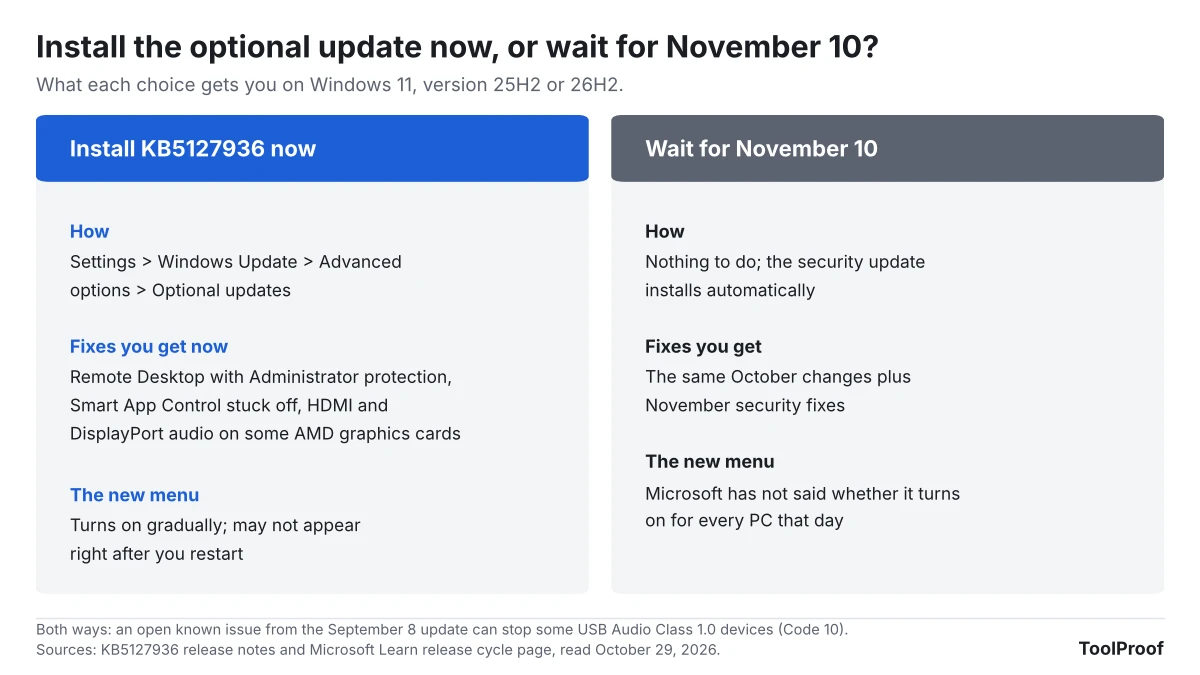
- To try the new menu now, go to Settings > Windows Update > Advanced options > Optional updates. Install the October 2026 preview update, KB5127936, then restart.
- Optionally, turn on Get the latest updates as soon as they're available on the Settings > Windows Update page. Microsoft says this puts your PC first in line for gradually released features, and you get the same security updates either way.
- Right-click a file in File Explorer. If Customize menu appears at the bottom, select it and switch off what you don't use.
- If it isn't there yet, wait. The menu turns on gradually even after the update is installed. Skip tools that promise to force hidden Windows features on.
Our take
Wait for November 10 unless one of KB5127936's fixes solves a problem you have now. Microsoft's own update schedule page (opens in a new tab) says the monthly security update carries the previous month's preview changes, so the menu's code reaches 25H2 and 26H2 PCs with that update in 12 days, without any action from you. Installing the preview early doesn't guarantee the menu either, because Microsoft is turning it on PC by PC. The October preview also leaves one known issue open, from the September 8 update, where some USB Audio Class 1.0 devices show a "Code 10" error or play no sound. If you rely on Remote Desktop with Administrator protection, can't turn Smart App Control back on, or lost HDMI sound on an AMD graphics card, the preview fixes those now and is worth installing.
The other view is that there is little to lose. Microsoft calls the preview's contents "production-quality improvements," and its early-update setting exists to get new features to you sooner. If the cluttered menu bothers you every day, installing now and turning on that setting is a reasonable bet.
The bigger lesson is about versions. A 24H2 Home or Pro PC lost security updates on October 13, and it won't get this menu either. If you've put off the free move to 26H2, this is one more reason to do it.
What to watch next
- November 10, 2026: the monthly security update for 25H2 and 26H2. Check whether Microsoft's notes still list the menu under gradual rollout.
- Version 26H1: whether a later update adds the menu to the newest PCs.
- Hiding the Customize menu entry: Insider builds got a switch for it on September 11, 2026, but the October 28 notes don't mention it.
- The USB audio issue: Microsoft says it is working on a fix and will update the KB5127936 notes.
FAQ
Can I make Windows 11 always show the full right-click menu?
Microsoft's notes for the new menu don't describe a setting that shows the full older menu every time. The Customize menu page lets you add the commands you use, such as Print, and show common commands as text. For anything else, Microsoft says to hold Shift while you right-click on the desktop.
Why don't I see Customize menu after installing KB5127936?
Microsoft lists the menu under gradual rollout, so it can appear days or weeks after the update on some PCs. Check that you're on version 25H2 or 26H2. On a work or school PC, your IT team controls when updates and new features arrive.
How we checked
On October 29, 2026, we read Microsoft's KB5127936 release notes (opens in a new tab) and KB5127653 (opens in a new tab) for version 26H1, the Windows 11 release information (opens in a new tab) page, the Windows message center (opens in a new tab), Microsoft's support articles on getting updates as soon as they're available (opens in a new tab) and finding your Windows version (opens in a new tab), and the Windows Insider posts of August 17 (opens in a new tab) and September 11, 2026 (opens in a new tab). The release notes screenshot comes from Microsoft's support page, opened in a browser with the "Gradual rollout" section expanded. We did not run Windows 11, so we haven't seen the new menu or its Settings page ourselves.