Microsoft 365 Family Storage Becomes One Shared 2TB Pool
Microsoft 365 Family and Premium move from 1TB per person to one 2TB pool. Existing plans switch at the first renewal on or after May 2, 2027. Who loses space.
- Published
- Reading time
- 7 min
- Category
- News & Analysis

Microsoft 365 Family and Premium no longer give each person 1 TB of OneDrive storage. New subscriptions since October 8, 2026 get one 2 TB pool that up to six people share, and existing subscriptions move to that pool at their first renewal on or after May 2, 2027. If three or more people on your plan use OneDrive, your household loses between 1 TB and 4 TB of total space. If you use Family alone, you gain 1 TB.
You don't need to do anything today, and nothing changes on an existing plan before May 2027. What you should do now is find out how much your family actually stores, and avoid two moves that bring the switch forward: upgrading to Premium, and letting your subscription expire and buying it again.
We read Microsoft's support pages on storage quotas, the storage change and cloud storage cleanup on October 18, 2026, and compared them with Microsoft's own plan pages.
What happened
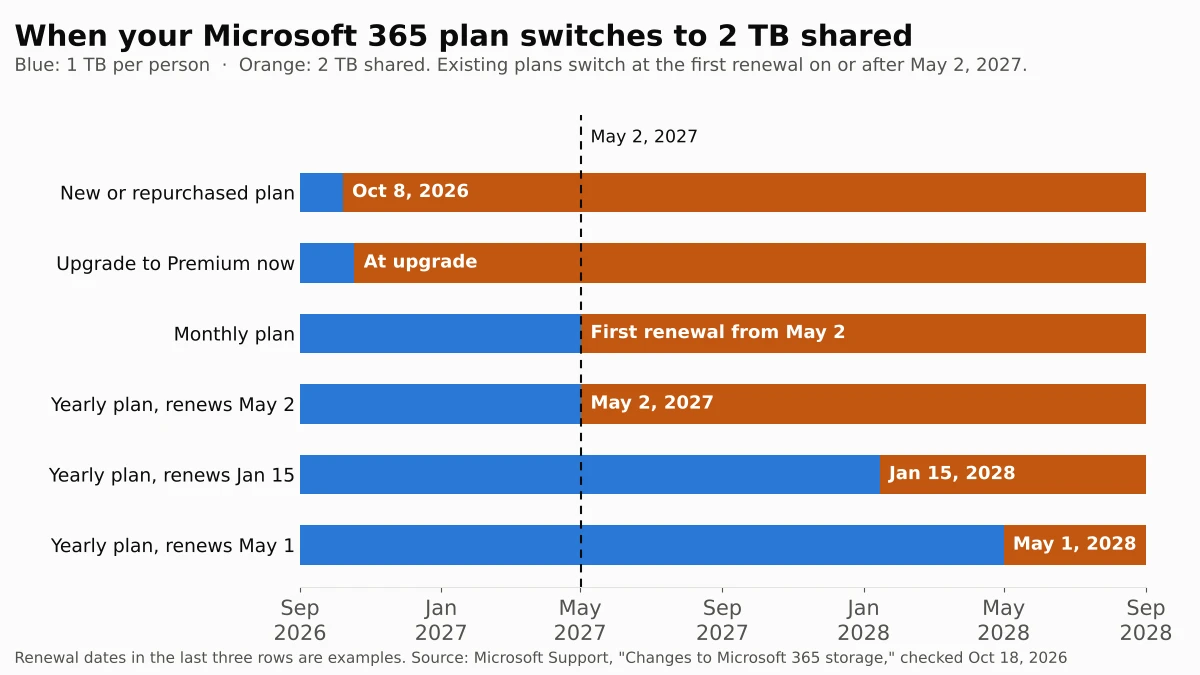
Microsoft's support article Changes to Microsoft 365 storage (opens in a new tab) and its storage quotas table (opens in a new tab) now describe two storage models. Plans started before October 8, 2026 list "1 TB per person" for up to six people. From October 8, new Family and Premium subscriptions, including expired ones you buy again, include 2 TB of shared storage. Existing Family and Premium subscriptions switch when they renew on or after May 2, 2027, and Microsoft says you'll get an email before your renewal.
Microsoft 365 Pro moves to 5 TB of shared storage, with existing Pro subscriptions switching on November 1, 2027. Microsoft 365 Personal (1 TB) and Basic (100 GB) are single-person plans and don't change. Microsoft says files stay private: each person still sees only their own files unless they share them.
Who is affected
| If you have... | What changes |
|---|---|
| Family or Premium, used by you alone | Your storage goes from 1 TB to 2 TB at the switch |
| Family or Premium, 2 people using OneDrive | Same 2 TB total, now one pool instead of 1 TB each |
| Family or Premium, 3 to 6 people using OneDrive | Total drops from 3–6 TB to 2 TB |
| A new or repurchased Family or Premium plan (since Oct 8, 2026) | Already on 2 TB shared |
| An existing Microsoft 365 Pro plan | Moves to 5 TB shared on November 1, 2027 |
| Microsoft 365 Personal or Basic | No change |
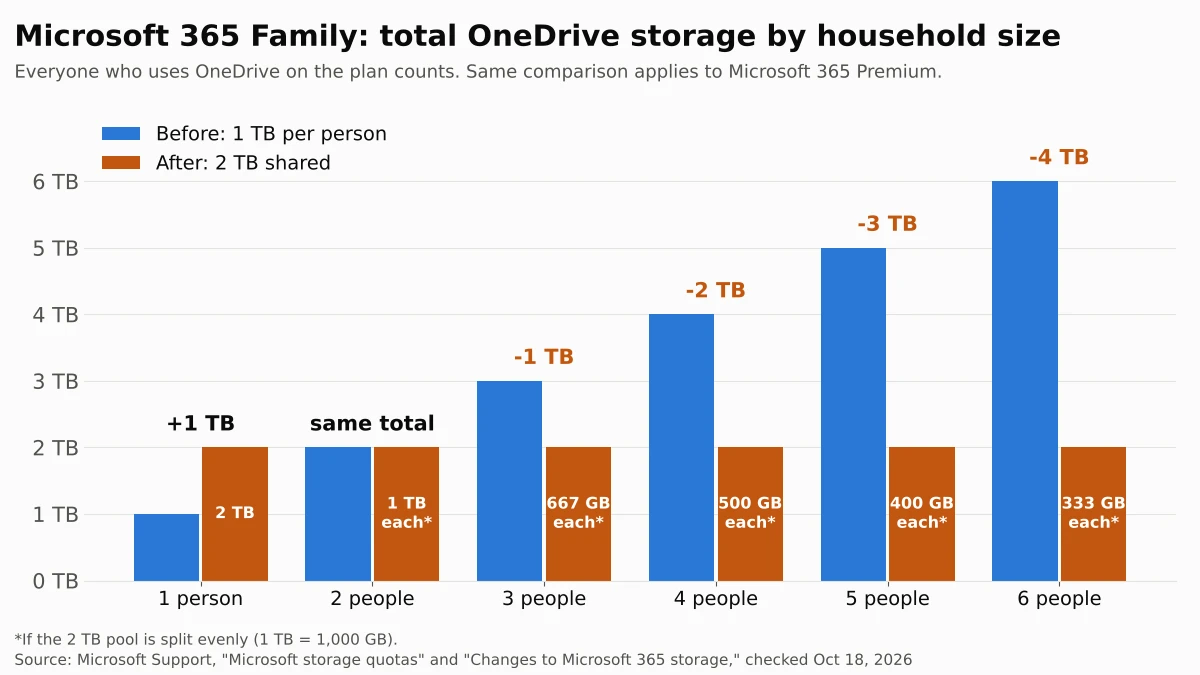
As of October 18, 2026, Family costs $129.99 a year and Premium $199.99 a year on Microsoft's plan comparison page (opens in a new tab). Microsoft hasn't announced a price change with the storage change, so a six-person Family plan goes from 6 TB to 2 TB at the same price.
What changes for you
The date depends on how you pay. Microsoft ties the switch to your first renewal on or after May 2, 2027, so a yearly plan that renews on May 1 keeps 1 TB per person until May 1, 2028, while a plan that renews on May 2, 2027 switches that day. A monthly plan switches at its first monthly renewal on or after May 2, 2027, so by early June 2027 at the latest.
Two actions move you to 2 TB shared early:
- Upgrading from Family to Premium. Microsoft says an upgrade before May 2, 2027 moves the subscription to shared storage right away, and Premium also has 2 TB. A downgrade alone doesn't trigger the switch.
- Letting the plan lapse and buying it again. Microsoft's quotas page says expired subscriptions that you repurchase count as new and get 2 TB shared.
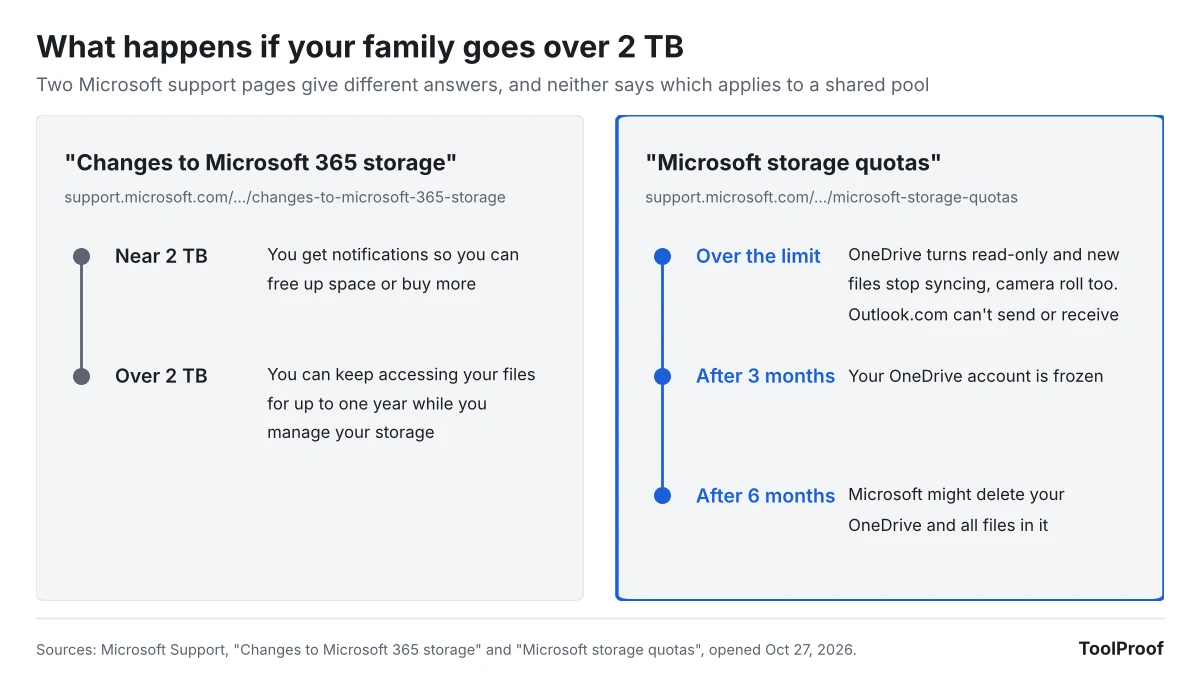
The bigger risk is what happens if the family goes over 2 TB. Microsoft's storage quotas page (opens in a new tab) says that when you exceed your quota, OneDrive files become read-only and stop syncing, including camera roll backups, and Outlook.com can't send or receive email. It says OneDrive accounts can be frozen after three months over the limit and deleted after six. The storage change article is more lenient: if the subscription goes over the 2 TB limit, you "can continue to access your files for up to one year" while you sort it out. Microsoft doesn't explain how those rules apply to a shared pool, so we would plan to stay under 2 TB instead of testing which one applies.
Microsoft also lets the subscription owner add storage, up to 10 TB in total, and any added storage joins the shared pool. Its support pages don't list the add-on price. Existing customers "in supported markets" may get temporary bonus storage at renewal, but Microsoft hasn't said which markets or how much.
What to do now
- Check how much your plan uses. Each person signs in to their Microsoft account dashboard (Microsoft's storage overview (opens in a new tab) links to it) and opens the Microsoft storage section. Add up the totals for everyone on the plan.
- Find your renewal date and billing type. At account.microsoft.com/services/microsoft365 (opens in a new tab), check whether you pay monthly or yearly and when the plan renews. That date, on or after May 2, 2027, is your switch date.
- If the total is under 2 TB, keep the plan. Nothing changes in practice, apart from no longer having a fixed 1 TB set aside for each person.
- If the total is over 2 TB, clean up before the switch. In OneDrive on the web, open the Recycle bin and select Empty recycle bin, because deleted files still count. Then sort files by size with Microsoft's largest files view (opens in a new tab) and check camera roll backups for videos and screenshots you don't need. Large videos are often the quickest win: our test of HandBrake settings for Discord and email shows how much smaller a video can get.
- Don't upgrade to Premium or let the plan lapse just yet. Both put you on 2 TB shared immediately. If you want Premium's AI features, compare that against how many months of 1 TB per person you would give up.
- Turn on recurring billing if it's off. If the plan expires and you buy it again later, it comes back with 2 TB shared.
Our take
Microsoft calls shared storage more flexible, and for one or two people it is: a solo Family subscriber gets twice the space for $129.99 a year, which now beats Personal's 1 TB for $99.99. But Family has always been sold as the plan for households of up to six, and for those households this is a 33% to 67% cut in total storage at an unchanged price. Microsoft's own OneDrive storage page (opens in a new tab) still advertised Family with "Up to 6 TB of secure cloud storage (1 TB per person)" when we checked on October 18, 2026, while the plan comparison page says 2 TB shared.
Our view: most existing subscribers should keep their plan, check usage once now, and decide again when Microsoft's renewal email arrives. You have at least six months, and up to about 18 months on a yearly plan, before anything changes. The households to worry about are those already near or above 2 TB combined, usually because several people back up phone photos and videos. For them, moving everything elsewhere is costly: Apple's iCloud+ price list (opens in a new tab) shows 6 TB at $29.99 a month in the U.S. as of October 18, 2026, or $359.88 a year, almost three times the price of Family.
The other side: few people fill 1 TB, and the typical family may never get close to a 2 TB pool. Microsoft also argues that one heavy user can now use more than 1 TB without buying extra storage. For those households, the switch changes the label on the plan more than their daily use.
What to watch next
- Microsoft's email before your renewal. It should confirm your switch date and whether you get bonus storage.
- May 2, 2027. Existing Family and Premium plans start switching at their next renewal from this date.
- November 1, 2027. Existing Microsoft 365 Pro plans move to 5 TB shared.
- Add-on storage prices. We'll update this article if Microsoft publishes prices for extra shared storage or details of the bonus storage.
Like the Windows 10 security update extension to October 2027, this is a Microsoft change with a long runway, so there is time to plan. For another subscription that now costs more than it first appears, see our breakdown of what iPhone Handoff costs on each carrier. Spotify is also tightening a family plan: it now asks some Premium Family members to scan a QR code in person within 7 days. Family and Premium also put Copilot in Word, Excel and PowerPoint for the plan owner; if you'd rather not see it, our guide shows how to turn off Copilot in Word and the other apps.