Compress Video for Discord and Email (7 Settings Tested)
We shrank three 1-minute 1080p clips with 7 settings in the free HandBrake 1.11.2. Neither Social preset suits Discord's 20 MB limit; a set bitrate does.
- Published
- Updated
- Reading time
- 9 min
- Category
- Apps & Software

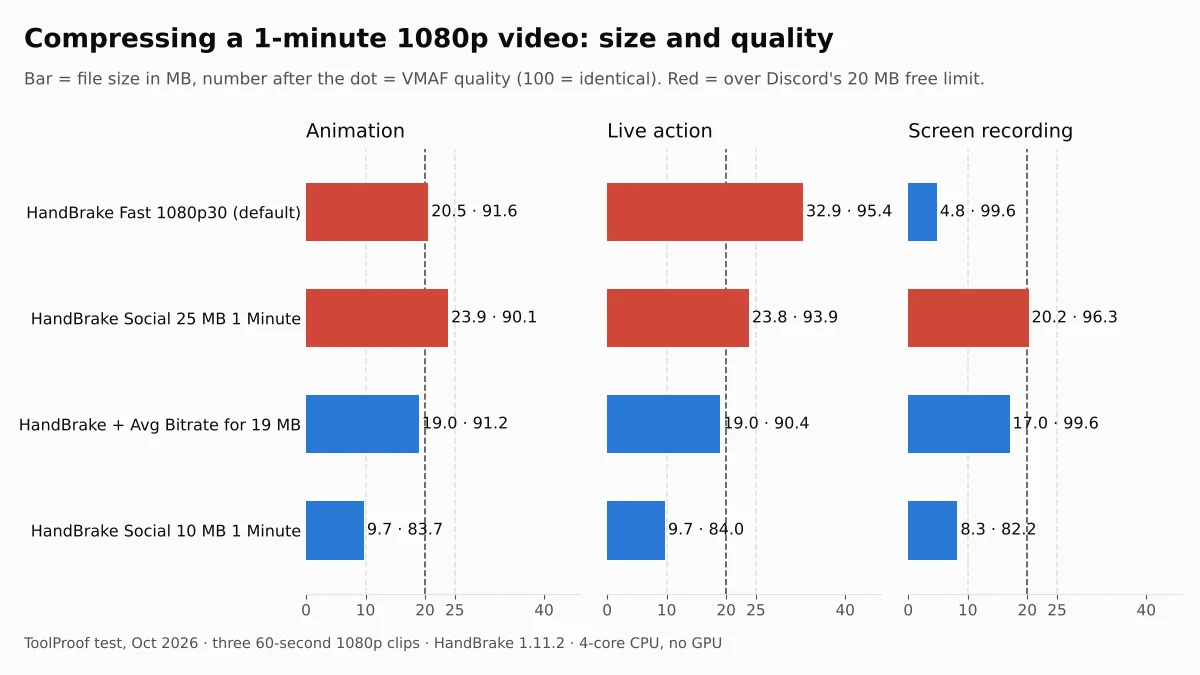
To compress a video for Discord, aim for 19 MB and set the bitrate yourself instead of picking a preset. As of October 2026, free Discord accounts can upload files up to 20 MB. HandBrake's built-in "Social" presets were made for 10 MB and 25 MB: the 10 MB one shrank our 1-minute clips to 540p and lost the most quality, and the 25 MB one made files of 20.2 to 23.9 MB, too big for Discord. Setting an average bitrate for 19 MB landed every clip at 17 to 19 MB at full resolution.
We tested 7 settings in HandBrake 1.11.2, a free, offline video converter, on October 16, 2026. Each one compressed the same three 60-second 1080p clips: a scene from an animated film, a live-action scene with faces, and a screen recording of a settings page with small text. We measured the file size, the quality against the original with VMAF (opens in a new tab), a perceptual video quality score developed by Netflix (higher is better, up to 100), and the time each encode took. HandBrake runs on your own computer, so your video is never uploaded.
Video size limits and what fits
| Where you send it | Size limit (as of October 2026) | Setting that fit in our test | Quality (VMAF) |
|---|---|---|---|
| Discord (free) | 20 MB per file | Bitrate set for 19 MB, 1080p | 90.4-99.6 |
| Discord Nitro Basic / Nitro | 50 MB / up to 1 GB | Fast 1080p30 for most 1-minute clips | 91.6-99.6 |
| Gmail (personal) | 25 MB of attachments | Social 25 MB 1 Minute | 90.1-96.3 |
| Older or stricter 10 MB limits | 10 MB | Social 10 MB 1 Minute (960 x 540) | 82.2-84.0 |
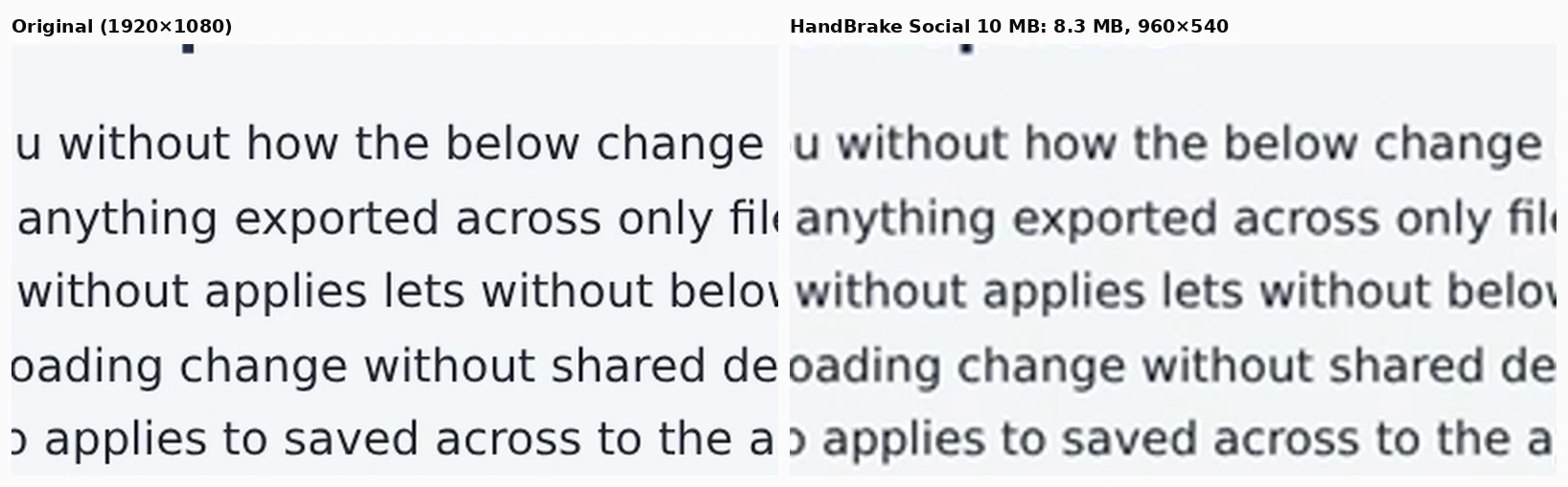
The limits come from Discord's File Attachments FAQ (opens in a new tab) and Google's Gmail attachment help page (opens in a new tab). Discord says the free limit went from 10 MB to 20 MB in August 2026, and that Nitro Basic offers 50 MB and Nitro up to 1 GB. Gmail turns attachments over 25 MB into a Google Drive link instead of attaching the file. The quality ranges cover our three clips. The screen recording scored highest, except with Social 10 MB, which cut it to 540p and blurred its small text.
How we tested
We cut three 60-second clips and saved each one in high quality (H.264 at CRF 14, about 7 to 12 Mbit/s for the two film clips), like a fresh recording from a phone or screen recorder:
- Animation: 1:30 to 2:30 of Big Buck Bunny (opens in a new tab) ((c) copyright 2008, Blender Foundation / www.bigbuckbunny.org (opens in a new tab), CC BY 3.0), scaled from 4K to 1920 x 1080, with stereo sound
- Live action: 3:00 to 4:00 of Tears of Steel (opens in a new tab) ((CC) Blender Foundation, mango.blender.org, CC BY 3.0), 1920 x 800 widescreen, with stereo sound
- Screen recording: a settings page with 16-pixel text, scrolling up and down, that we built and recorded ourselves at 1920 x 1080 with no sound
We judged each setting on three things:
- Size: does the file fit under the limit, and how much of the limit does it use? We aimed at 19,000,000 bytes for Discord because its help page doesn't say whether "20MB" means 20,000,000 bytes or 20 x 1,024 x 1,024
- Quality: VMAF between the compressed video and the original, on every third frame, with smaller videos scaled back up to the original size first. We report the average score
- Speed: time for one run of each setting on a 4-core 2.8 GHz Intel Xeon with 16 GB of RAM and no GPU, including both passes when a setting uses two
HandBrake's official presets are fixed recipes, so we read their settings from HandBrake itself. Social 10 MB 1 Minute 540p60 encodes H.264 at an average of 1,125 kbit/s in two passes and caps the picture at 960 x 540. Social 25 MB 1 Minute 720p60 uses 3,000 kbit/s at up to 1280 x 720. Both add 160 kbit/s AAC audio.
How to compress a video for Discord in HandBrake
HandBrake has a normal window, runs on Windows, Mac and Linux, and is free and open source according to the HandBrake website (opens in a new tab). On Windows it needs Microsoft's .NET Desktop Runtime 10.0, according to its system requirements (opens in a new tab). Instead of a Social preset, keep the default Fast 1080p30 preset and set the bitrate:
- Open your video in HandBrake. The default preset is Fast 1080p30.
- Go to the Video tab and switch from Constant Quality to the average bitrate option (labeled Bitrate (kbps) in the Linux version we checked).
- Enter the number for your video's length from the table below.
- Turn on Multi-Pass Encoding and Turbo Analysis Pass.
- On the Audio tab, set the AAC bitrate to 128.
- Click Start Encode, then check the file size before you upload.
| Video length | Discord (aim for 19 MB) | Gmail (aim for 24 MB) |
|---|---|---|
| 30 seconds | 4,880 kbps | 6,200 kbps |
| 1 minute | 2,380 kbps | 3,040 kbps |
| 2 minutes | 1,120 kbps | 1,450 kbps |
| 3 minutes | 700 kbps | 920 kbps |
These numbers assume 128 kbit/s audio and leave 1% for the file's container. To work it out for another length: video kbps = target MB x 8,000 / seconds x 0.99 - 128. With 2,380 kbps, our three 1-minute clips came out at 19.0, 19.0 and 17.0 MB. The screen recording stayed under because there was so little movement to encode.
HandBrake's own guide to constant quality and average bitrate (opens in a new tab) recommends constant quality "unless you really need to aim for a target filesize", and says multi-pass encoding "will provide better quality and better bit-rate distribution". A size limit is that case.
Why not the Social presets?
HandBrake's official presets page (opens in a new tab) says the Social presets "are designed to guarantee video up to a certain duration will produce a file smaller than a specific size". They did: every Social 10 MB file was 8.3 to 9.7 MB, and every Social 25 MB file was under 25 MB. But neither size matches Discord's current limit:
- Social 10 MB 1 Minute uses only half of the 20 MB you're allowed and drops the picture to 960 x 540. It had the lowest scores in our test, 82.2 to 84.0, and small text on the screen recording turned soft
- Social 25 MB 1 Minute made files of 23.8 to 23.9 MB with sound and 20.2 MB without, all over 20,000,000 bytes. It's a good fit for Gmail
What the default HandBrake preset does
Fast 1080p30 keeps the quality steady and lets the size follow the video. Our 1-minute clips came out at 20.5 MB for the animation, 32.9 MB for the live-action scene and 4.8 MB for the screen recording. So it might fit Discord, or it might not: it depends on how much is moving on screen. HandBrake's quality guide (opens in a new tab) recommends RF 20 to 24 for 1080p with the x264 and x265 encoders; Fast 1080p30 uses RF 22.
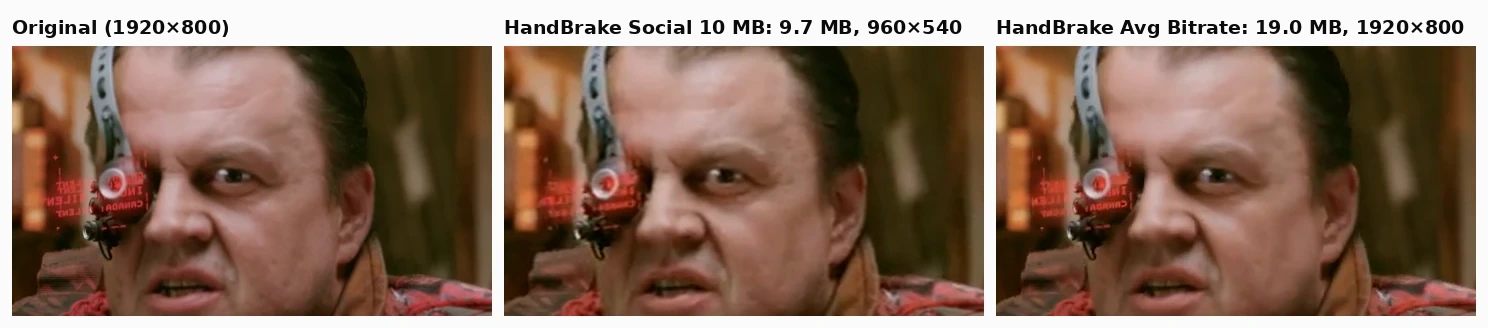
With a bitrate set for 19 MB, changing Encoder Preset to slow and the H.264 profile to high raised the scores a little: from 90.4 to 92.7 on the live-action clip and from 91.2 to 92.2 on the animation. It also took longer, 4.8 minutes for our three clips against 3.6. In the faces below, the 19 MB file looks close to the original, while the 540p Social 10 MB file is visibly softer.
One caveat about our HandBrake numbers. On the animation and live-action clips, HandBrake's files differed slightly from the original even at near-lossless quality (RF 5), and we couldn't find the cause. That may have lowered its scores on those two clips by a few points.
How long does it take?
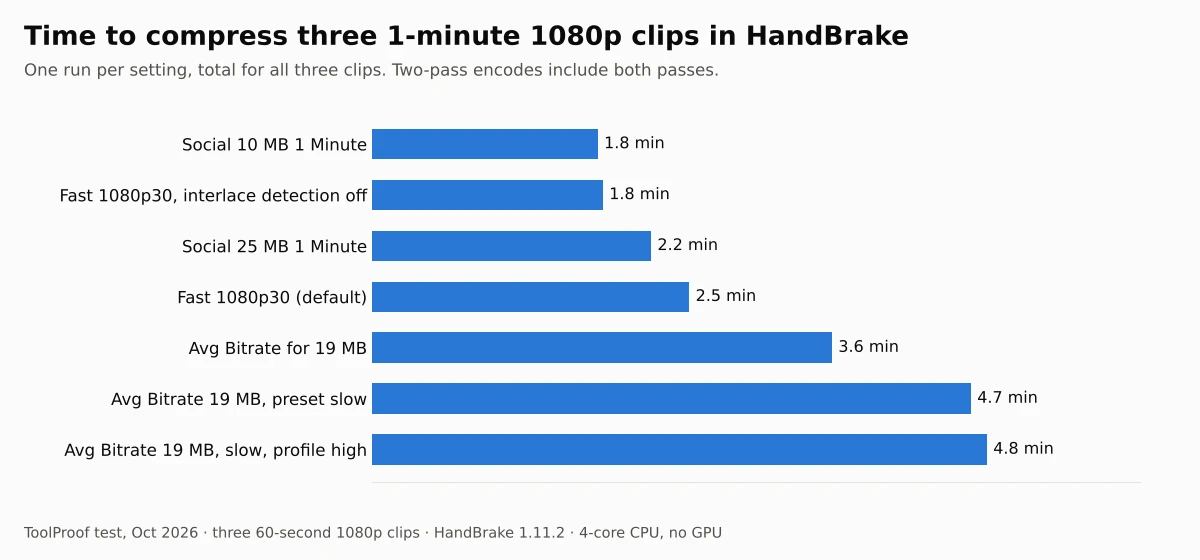
On our 4-core CPU, every HandBrake setting finished three 1-minute clips in under 5 minutes. A bitrate set for 19 MB, with two passes, took 3.6 minutes, against 2.5 minutes for the default Fast 1080p30 preset. A computer with a newer or faster processor will be quicker.
What about Discord's own compression on your phone?
Discord's mobile app compresses videos when you upload them, according to its Video Upload Quality Settings on Mobile FAQ (opens in a new tab). For accounts without Nitro, Best Quality uploads at up to 720p and the default Standard at 480p. You'll find the setting under User Settings > App Settings > Text & Media > Video Uploads. Discord also says it now checks the file size before compression, so a phone video counts against the 20 MB limit at its original size. Compressing it yourself first avoids that and lets you keep 1080p.
Full results
| Setting | Animation | Live action | Screen recording | Time for 3 clips |
|---|---|---|---|---|
| HandBrake Fast 1080p30 (default) | 20.5 MB · 91.6 | 32.9 MB · 95.4 | 4.8 MB · 99.6 | 2.5 min |
| HandBrake Fast 1080p30, interlace detection off | 20.5 MB · 91.5 | 32.6 MB · 95.4 | 4.8 MB · 99.6 | 1.8 min |
| HandBrake Social 10 MB 1 Minute 540p60 | 9.7 MB · 83.7 | 9.7 MB · 84.0 | 8.3 MB · 82.2 | 1.8 min |
| HandBrake Social 25 MB 1 Minute 720p60 | 23.9 MB · 90.1 | 23.8 MB · 93.9 | 20.2 MB · 96.3 | 2.2 min |
| HandBrake bitrate for 19 MB | 19.0 MB · 91.2 | 19.0 MB · 90.4 | 17.0 MB · 99.6 | 3.6 min |
| HandBrake bitrate for 19 MB, preset slow | 19.0 MB · 91.7 | 19.0 MB · 91.4 | 16.5 MB · 99.6 | 4.7 min |
| HandBrake bitrate for 19 MB, preset slow, profile high | 19.0 MB · 92.2 | 19.0 MB · 92.7 | 16.5 MB · 99.6 | 4.8 min |
Each cell is file size and average VMAF. Sizes are in millions of bytes. All clips are 60 seconds; the animation and live-action files include stereo AAC audio (160 kbit/s in HandBrake's presets, 128 kbit/s with a set bitrate). Times are one run each, and some runs overlapped with other work on the test machine, so treat time differences under about 30% as noise. Turning off HandBrake's interlace detection didn't change quality.
Other tools we looked at
- Online compressors: they ask you to upload the video, which HandBrake doesn't need. We didn't test them
- Discord's mobile app compression: limited to 720p without Nitro, and the 20 MB check happens before it compresses (see above)
- HandBrake's hardware encoders (NVENC, Quick Sync, VideoToolbox): faster on computers that have them, but our test machine had no GPU, so we couldn't measure them
For photos that are too big to send, see our test of compressing an image to 100 KB and our HEIC to JPG converter test. Our list of free offline AI tools covers chatbots, transcription and other tools that also run without uploading anything. Our guide to free photo and video tools has our pick for each of these jobs.
Which one should you use?
- You want the easy way for Discord: HandBrake with Fast 1080p30 and the bitrate from the table. Every clip fit in 17 to 19 MB at full resolution
- You want a little more quality in 20 MB: also set Encoder Preset to slow and the H.264 profile to high, if you can wait about a third longer
- You're emailing it from Gmail: HandBrake Social 25 MB 1 Minute for clips up to a minute, or a bitrate set for 24 MB
- Your limit is 10 MB: HandBrake's Social 10 MB 1 Minute preset fits, but it drops the picture to 540p and blurs small text