iOS 27.2 Lets Siri AI Remember Past Chats and Read Your Voicemails
iOS 27.2 lets Siri AI recall past chats and use voicemails, Messages photos and Calendar guests. We matched Apple's docs to see which setting limits each one.
- Published
- Reading time
- 8 min
- Category
- News & Analysis

Apple's iOS 27.2 update, released October 26, 2026, lets Siri AI recall your past conversations and pull answers from photos attached in Messages, Calendar event attendees and your voicemails. It only reaches people who turned on Siri AI (Beta) on an iPhone 15 Pro, iPhone 15 Pro Max or an iPhone 16 model or later. Apple's guide lists no switch that turns off the recall on its own: you limit it by deleting Siri conversations or shortening Settings > Siri > Keep Conversations, and you keep an app's data away from Siri with the new Settings > Siri > Excluded Apps list, which also removes that app from Search and suggestions.
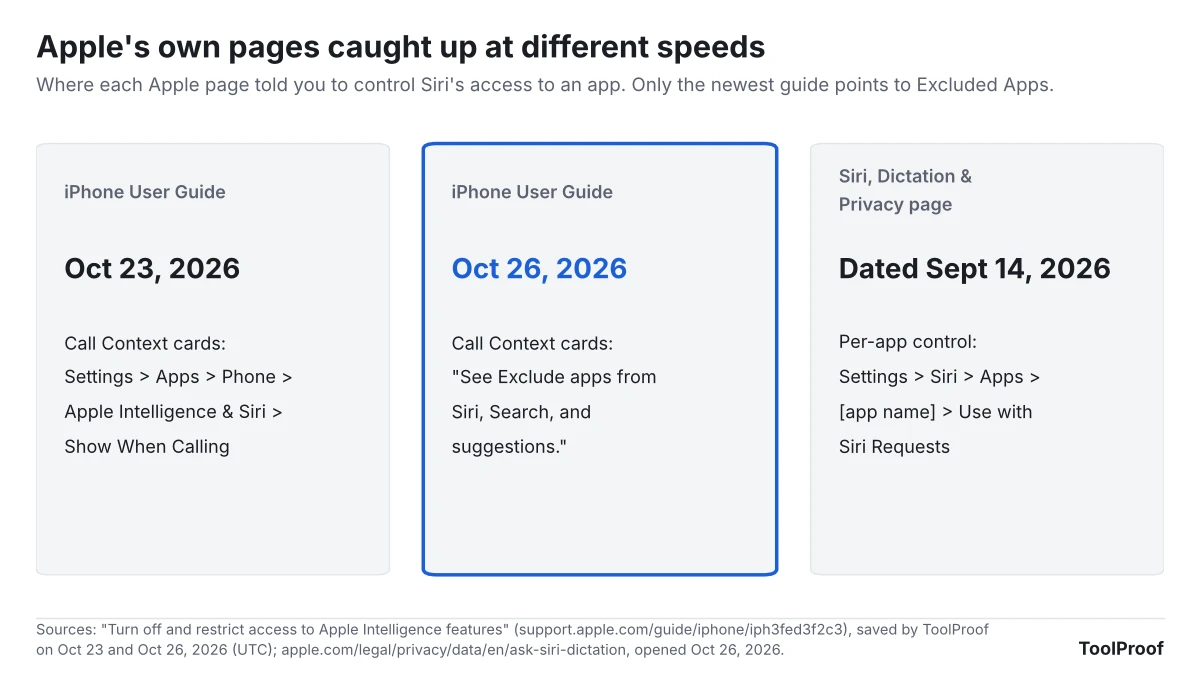
On October 26 (UTC), we compared Apple's iOS 27.2 release notes with five iPhone User Guide pages, two Apple privacy pages and three security notes, and checked them against the copy of the guide we saved on October 23 for our guide to turning off Apple Intelligence on iPhone. Apple's own pages don't agree yet: the updated guide sends you to Excluded Apps, while Apple's Siri privacy page, dated September 14, still describes a switch inside each app's Siri settings.
| What changed in iOS 27.2 | Who gets it | Where you control it |
|---|---|---|
| Siri AI recalls past conversations | Siri AI users on iPhone 15 Pro and later | Siri app history, Keep Conversations |
| Siri AI uses Messages photos, Calendar attendees and voicemails | Siri AI users on iPhone 15 Pro and later | Excluded Apps: Messages, Calendar, Phone |
| One list of apps hidden from Siri, Search and suggestions | Listed with the Siri AI changes | Settings > Siri > Excluded Apps |
| 163 security fixes | iPhone 11 and later | Settings > General > Software Update |
What happened
Apple released iOS 27.2 for the iPhone 11 and later on October 26, 2026. Its release notes (opens in a new tab) say the update gives Siri AI "the ability to retain useful context from previous Siri interactions as well as draw from a wider range of personal context." Under the Siri AI heading, for all iPhone 16 models and later, iPhone 15 Pro and iPhone 15 Pro Max, Apple lists these changes:
- Siri AI "can recall your past conversations, so you can ask Siri about something it told you before, like the restaurants it recommended last week."
- Siri AI can draw on "photos attached in Messages, Calendar event attendees, your voicemails, and better results from Safari history and Reading List."
- Excluded Apps "lets you choose which apps Siri, Search, and suggestions can access, all from one setting."
- You can select and copy part of a Siri response.
- Siri AI now works in French, Japanese, Korean, Portuguese and Spanish, and still isn't available in the EU or mainland China (Apple Newsroom (opens in a new tab)).
The same day, Apple released iOS 26.7.2 for iPhones that stay on iOS 26 and iOS 18.7.11 for the iPhone XS, XS Max and XR (Apple security releases (opens in a new tab)). Other iOS 27.2 additions include Suggestions in Messages, Apple TV profiles and support for SynthID, the invisible AI watermark we explained in how to check if an image is AI-generated, in Photos and Image Playground.
Who is affected
Only iPhones that can run Siri AI get the new memory, and only if you turned Siri AI on. Apple's Siri AI guide (opens in a new tab) says you switch it on yourself with Settings > Siri > Try Siri AI (Beta), and that it isn't available to users under 13.
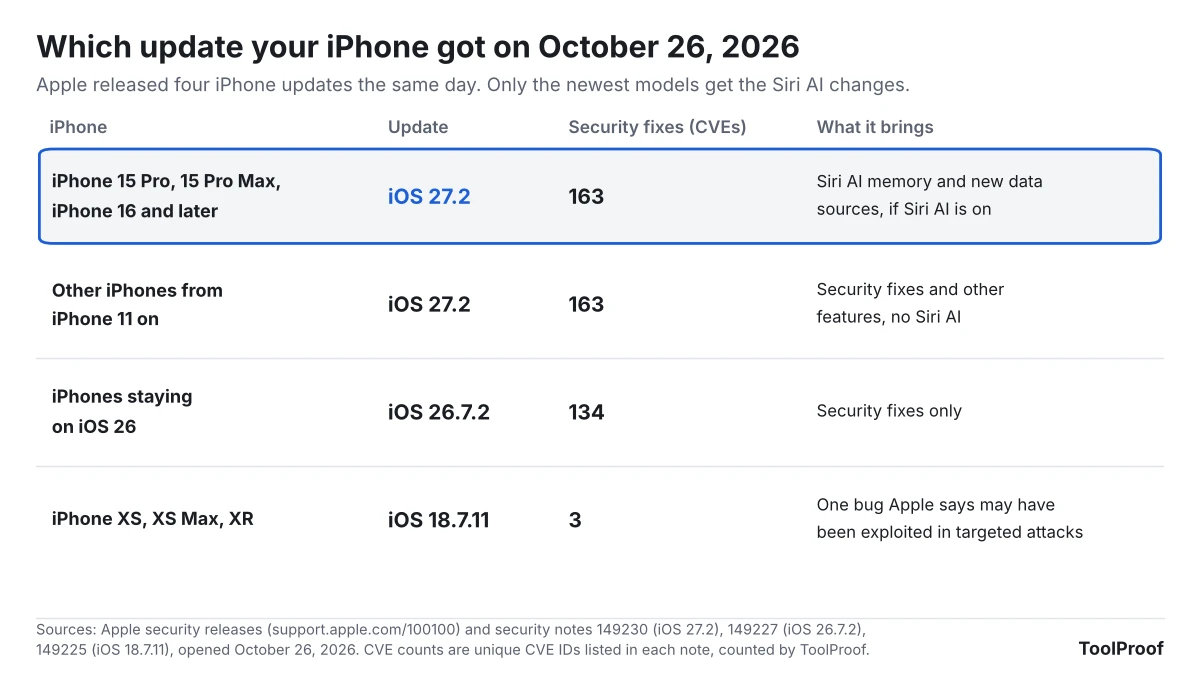
| You have | Update | What changes for you |
|---|---|---|
| iPhone 15 Pro, 15 Pro Max or iPhone 16 and later, Siri AI on | iOS 27.2 | Siri recalls past chats and reads more of your data |
| Same iPhone, Siri AI never turned on | iOS 27.2 | Nothing changes for Siri until you choose Try Siri AI (Beta) |
| iPhone 11 through iPhone 15 Plus, iPhone SE (2nd and 3rd generation) | iOS 27.2 | No Siri AI. 163 security fixes and other features |
| iPhone XS, XS Max or XR | iOS 18.7.11 | 3 fixes, including one Apple says "may have been exploited" in targeted attacks on versions before iOS 27 (Apple (opens in a new tab)) |
| In the EU or under 13 | iOS 27.2 | Siri AI isn't available |
What changes for you
Siri AI already searched your photos, mail, messages and calendar to answer questions. In iOS 27.2, it can also look back at your earlier Siri conversations, and it reaches three kinds of data it didn't list before: photos people attach in Messages, who is invited to your Calendar events, and your voicemails. Apple's Siri app guide (opens in a new tab) says those conversations are saved in the Siri app and sync to your other Apple devices signed in to the same Apple Account.
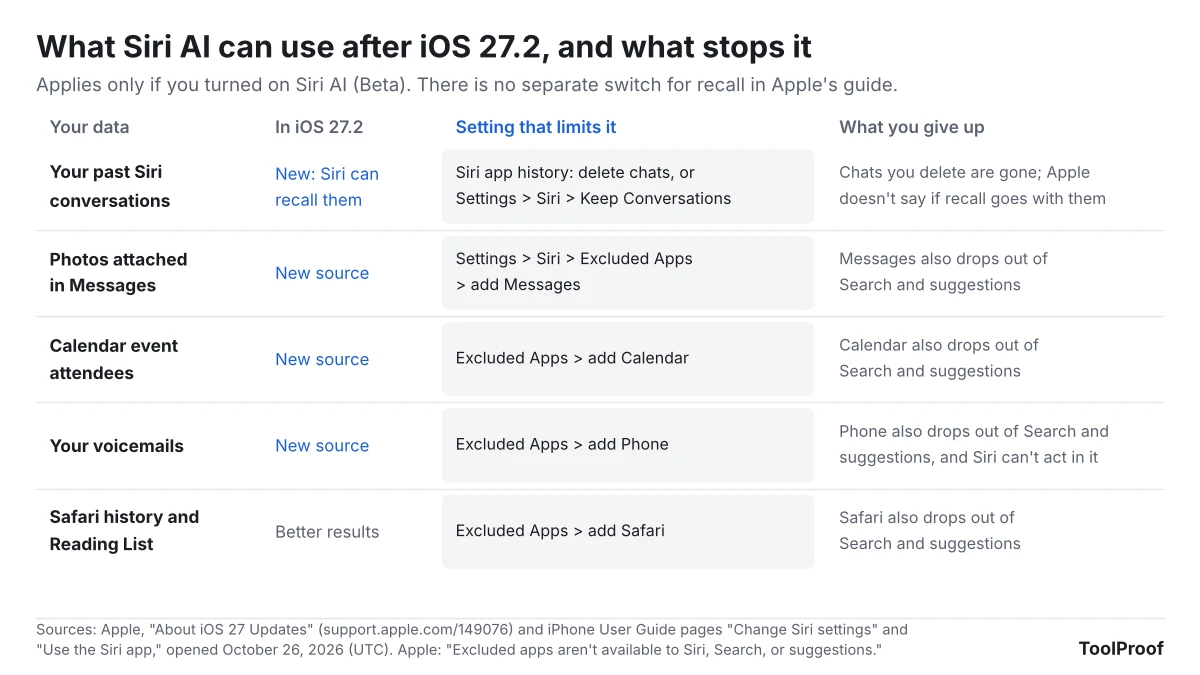
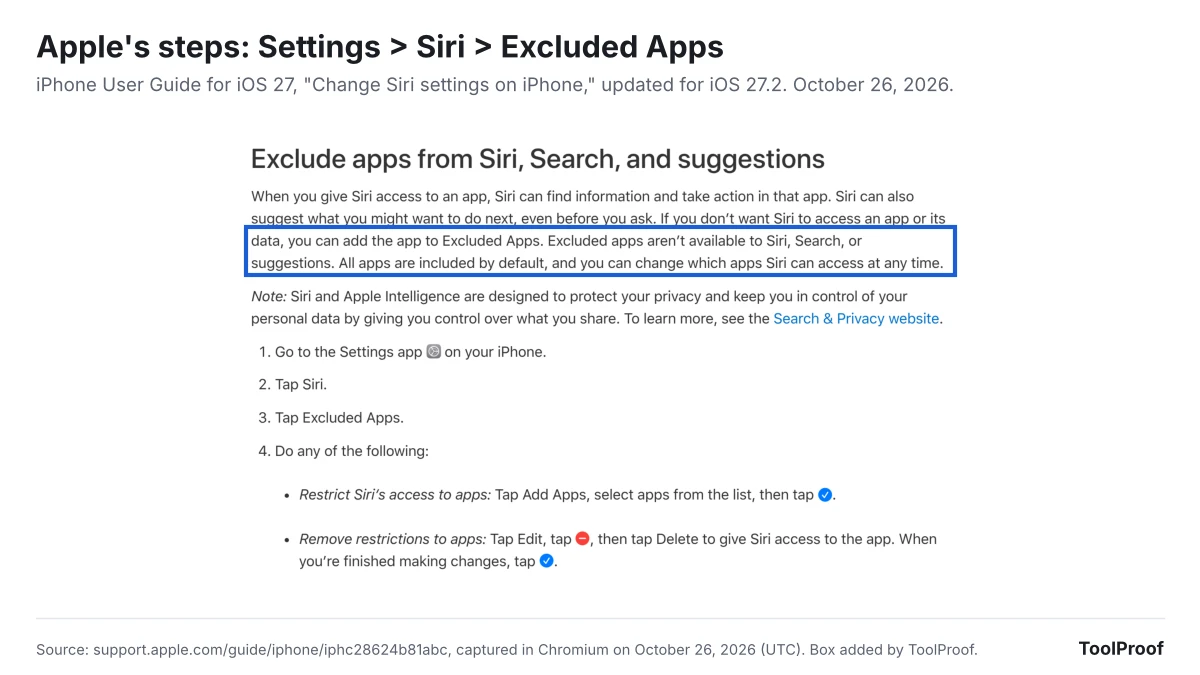
Excluded Apps works one whole app at a time. Apple's Siri settings guide (opens in a new tab) says "Excluded apps aren't available to Siri, Search, or suggestions," and that all apps are included by default. So adding Messages to keep its photos away from Siri also takes Messages out of Search and suggestions. Because the same guide says app access is what lets Siri "find information and take action in that app," excluding Phone to protect voicemails should also stop Siri from acting in the Phone app. We couldn't test that on an iPhone.
Apple's guide and release notes don't describe a setting that turns off the recall while keeping Siri AI on, as of October 27, 2026. The controls Apple documents for Siri conversations are deleting them and choosing how long to keep them, and Apple doesn't say whether deleting a conversation also removes what Siri retained from it. Our guide to seeing and deleting Siri history on iPhone covers the other places your Siri requests are kept, including Apple's own copy.
Apple's pages also differ on where your requests go. Its Apple Intelligence privacy guide (opens in a new tab) says requests sent to Private Cloud Compute, Apple's servers for larger models, are "not stored or made accessible to Apple." Its Siri, Dictation & Privacy page (opens in a new tab), dated September 14, 2026, says Apple stores transcripts of Siri interactions under a random identifier and may keep them for up to two years. Neither page says which rule covers a Siri AI conversation.
What to do now
You can update first and adjust Siri afterward, or skip Siri AI entirely. Apple's update guide (opens in a new tab) and Siri pages give these steps:
- Install the update. Go to Settings > General > Software Update. An iPhone XS, XS Max or XR gets iOS 18.7.11 from the same screen, and that one fixes a bug Apple says may have been exploited.
- Shorten how long Siri keeps conversations. Go to Settings > Siri > Keep Conversations and choose 30 days or 1 year. Apple says older conversations are then permanently deleted.
- Delete conversations you don't want Siri to look back on. In the Siri app, touch and hold a conversation and tap Delete. To remove several, tap the button in the top-right corner, then Select.
- Keep an app's data away from Siri. Go to Settings > Siri > Excluded Apps > Add Apps, select Messages, Calendar, Phone or Safari, then tap the checkmark. Those apps also disappear from Search and suggestions.
- See what went to Apple's servers. Go to Settings > Privacy & Security > Apple Intelligence Report, choose the last 7 days, then tap Export Activity.
- Turn Siri AI off. Go to Settings > Siri > Turn Off Siri, then Turn on Siri > Siri Classic. Our guide to turning off Apple Intelligence on iPhone covers the other features and the Screen Time lock.
Our take
Siri AI's memory needs its own off switch and a clear answer on deletion before it leaves beta. Apple is adding recall and three new data sources in one update, but the only documented ways to limit recall are deleting conversations or shortening their storage, and the only way to wall off an app also removes it from Search. Google's Gemini, by comparison, has a separate Memory switch and lets you ask "Did you use any info from past chats?" (Gemini Apps Help (opens in a new tab)), as we covered in our guide to turning off Gemini Apps Activity. Apple should also update its Siri privacy page, which still points to a per-app switch and doesn't say how long Siri AI conversations are kept on its side.
The other view: Siri AI is opt-in, much of it runs on the iPhone or on servers Apple says don't store requests, and one Excluded Apps list is easier to manage than a switch inside every app. For most people, setting Keep Conversations to 30 days and excluding Phone if voicemails are sensitive is a reasonable middle ground.
What to watch next
- More languages: Apple says Chinese (Traditional), Norwegian, Turkish and Vietnamese come "by the end of the year" (Apple Newsroom (opens in a new tab)).
- A paid tier: Apple says Siri AI has daily usage limits and that "expanded access to such features will be available for a fee in the future," without a date or price (Apple Newsroom (opens in a new tab)).
- A memory control: whether a later update adds a separate switch for recall, and whether Apple updates its Siri privacy page.
- The EU: Siri AI is still unavailable there on iPhone, iPad and Apple Watch.
For every AI setting we track across Chrome, Gmail, Windows and iPhone, see our guide to turning off AI features.
How we checked
On October 26, 2026 (UTC), we opened Apple's "About iOS 27 Updates" release notes, the iOS 27 iPhone User Guide pages "Change Siri settings," "Get started with Siri AI," "Use the Siri app," "Apple Intelligence and privacy" and "Turn off and restrict access to Apple Intelligence features," the Siri, Dictation & Privacy and Search & Privacy pages, and the security notes for iOS 27.2, iOS 26.7.2 and iOS 18.7.11. We compared the "Turn off and restrict access" page with the copy we saved on October 23 and counted the unique CVE IDs in each security note. We didn't have an iPhone running iOS 27.2, so the menu names come from Apple's guide, not our own screen.