Best Free Offline AI Tools for Your PC (2026, Tested)
We ran free AI tools fully offline on a 4-core PC with no GPU: 7 chatbot models and speech-to-text. Our picks, RAM needs and built-in image-to-text tools.
- Published
- Updated
- Reading time
- 9 min
- Category
- AI Tools
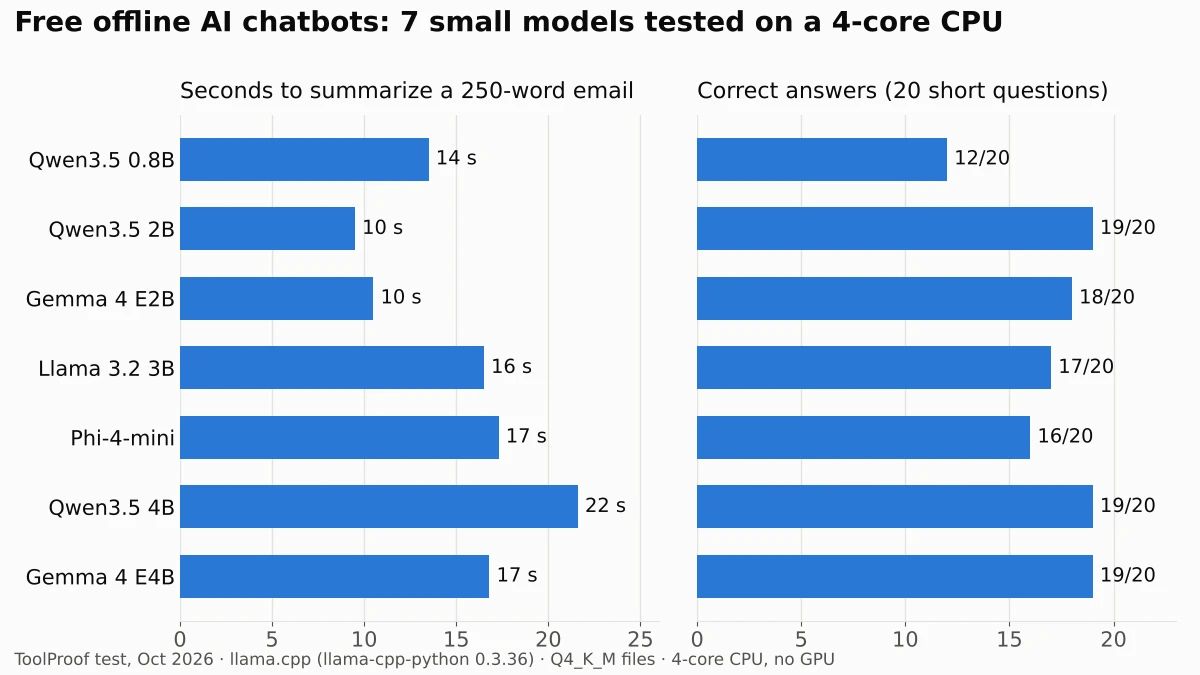
You can run three everyday AI jobs on your own PC for free and with no internet connection: chatting with an AI assistant, transcribing audio and copying text out of images. In our tests on a plain 4-core computer with no graphics card, the chatbot and transcription models worked fully offline once downloaded, and most of our top picks needed less than 3 GB of memory. For an offline chatbot, small models such as Qwen3.5 2B and Gemma 4 E2B answered 18 to 19 of our 20 test questions correctly and summarized an email in about 10 seconds.
This page collects what we measured. For the chatbot, we ran seven free models through the same email summary and 20 short questions on October 14, 2026. The transcription results come from our separate, more detailed test, linked in its section. For image to text, we point you to the tools already built into Windows, Mac and iPhone. Everything here is free, and none of it needs an account once it's installed.
Best free offline AI tools at a glance
| Job | Our pick | Free app to run it | Speed on our 4-core CPU | Peak RAM | Details |
|---|---|---|---|---|---|
| Chatbot (ChatGPT-style) | Qwen3.5 2B or Gemma 4 E2B | LM Studio, Jan | About 10 s to summarize a 250-word email | 2.7–4.2 GB | Below |
| Speech to text | Parakeet TDT (v2 for English) or Whisper turbo | Vibe, Buzz, Handy | 1 min 45 s for a 22-minute call | 1.3 GB | 8 transcription models tested |
| Image to text (OCR) | Snipping Tool (Windows) or Live Text (Mac, iPhone) | Built in; NAPS2 for scans | Not measured | Not measured | Steps for built-in OCR tools |
The speed column comes from different test days. The chatbot ran on a 2.3 GHz server and the transcription test on a 2.8 GHz one, so compare models within a row, not across rows. A recent laptop, especially one with a graphics card or an Apple silicon chip, will usually be faster.
Offline AI chatbot: which free model to use
The best free offline chatbot model for an ordinary computer in our test was Qwen3.5 2B: it got 19 of 20 questions right, wrote the fastest email summary and used 2.7 GB of memory. Gemma 4 E2B was nearly as good (18 of 20, same speed) and was one of only four models that kept all four dates and deadlines in its summary, but it needed 4.2 GB.
| Model | Correct (of 20) | Email summary | Words per second | Wait for first word | Download | Peak RAM | License |
|---|---|---|---|---|---|---|---|
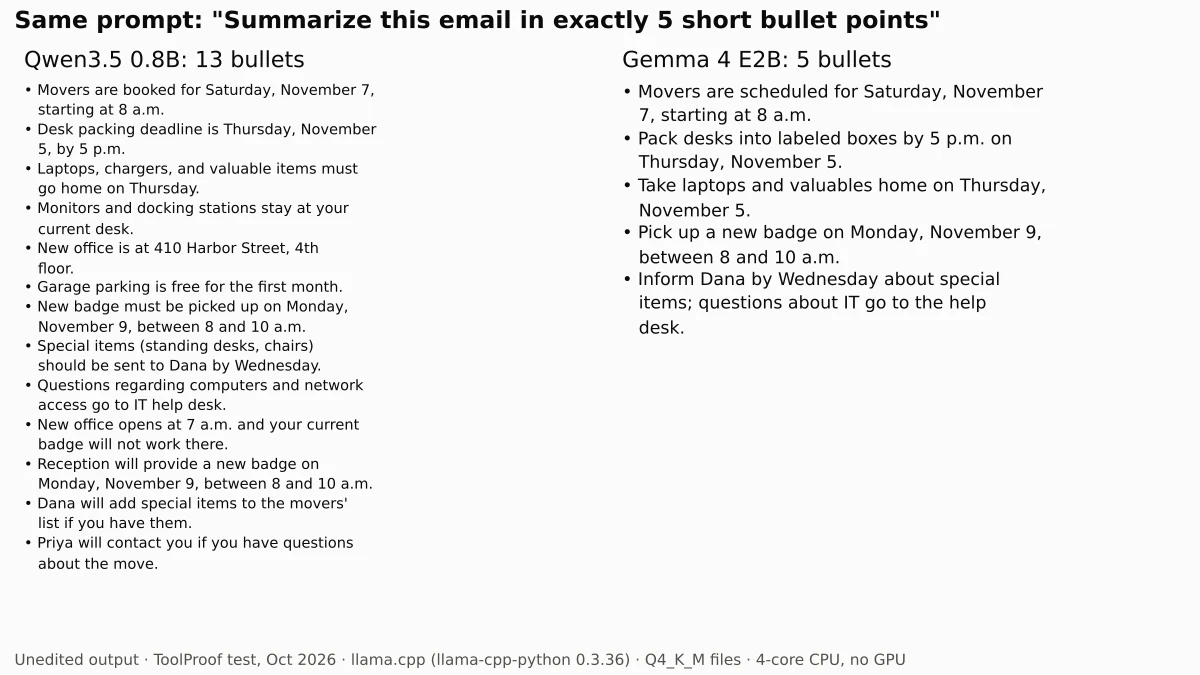
| Qwen3.5 0.8B | 12 | 14 s, ignored "5 bullets" | 12.8 | 0.9 s | 0.5 GB | 1.3 GB | Apache 2.0 |
| Qwen3.5 2B | 19 | 10 s | 6.7 | 1.8 s | 1.3 GB | 2.7 GB | Apache 2.0 |
| Gemma 4 E2B | 18 | 10 s, all 4 dates | 8.8 | 2.1 s | 3.1 GB | 4.2 GB | Apache 2.0 |
| Llama 3.2 3B | 17 | 16 s | 7.1 | 2.9 s | 2.0 GB | 4.4 GB | Llama 3.2 Community License |
| Phi-4-mini | 16 | 17 s | 5.5 | 3.3 s | 2.5 GB | 5.4 GB | MIT |
| Qwen3.5 4B | 19 | 22 s, all 4 dates | 3.9 | 4.2 s | 2.7 GB | 5.6 GB | Apache 2.0 |
| Gemma 4 E4B | 19 | 17 s, all 4 dates | 4.7 | 4.0 s | 5.0 GB | 7.8 GB | Apache 2.0 |
Speeds are medians of three runs. "Words per second" is how fast text appeared once the model started answering. Download sizes are the 4-bit files we used; the files an app downloads may be packaged differently, so your sizes and speeds will vary.
- Best for most computers: Qwen3.5 2B. It had the best score-to-speed ratio, and its 2.7 GB peak leaves room for a browser on an 8 GB laptop. Its one wrong answer was a recipe question (it said 22.5 cups of sugar instead of 1 7/8), and its summary left out the Wednesday deadline.
- Best summaries on a modest PC: Gemma 4 E2B. It wrote five clean bullets with every date and deadline, about as fast as Qwen3.5 2B. It missed two math questions.
- If you have 16 GB of RAM: Gemma 4 E4B. It got all eight math questions right and wrote a complete summary, but it was slower and peaked at 7.8 GB. Its one miss was a fact: it said water boils at 32 degrees Fahrenheit.
- Skip for anything factual: Qwen3.5 0.8B. It was the fastest, but it said the capital of Australia is Sydney, got six of eight math questions wrong and wrote 13 bullet points when we asked for five.
Treat the scores as a sanity check, not a ranking. Twenty questions are enough to separate the tiny model from the rest, but a gap of one or two answers between the larger models could flip with different questions. Every model made at least one mistake, so check anything important, the same way you would with ChatGPT.
How much memory an offline chatbot needs
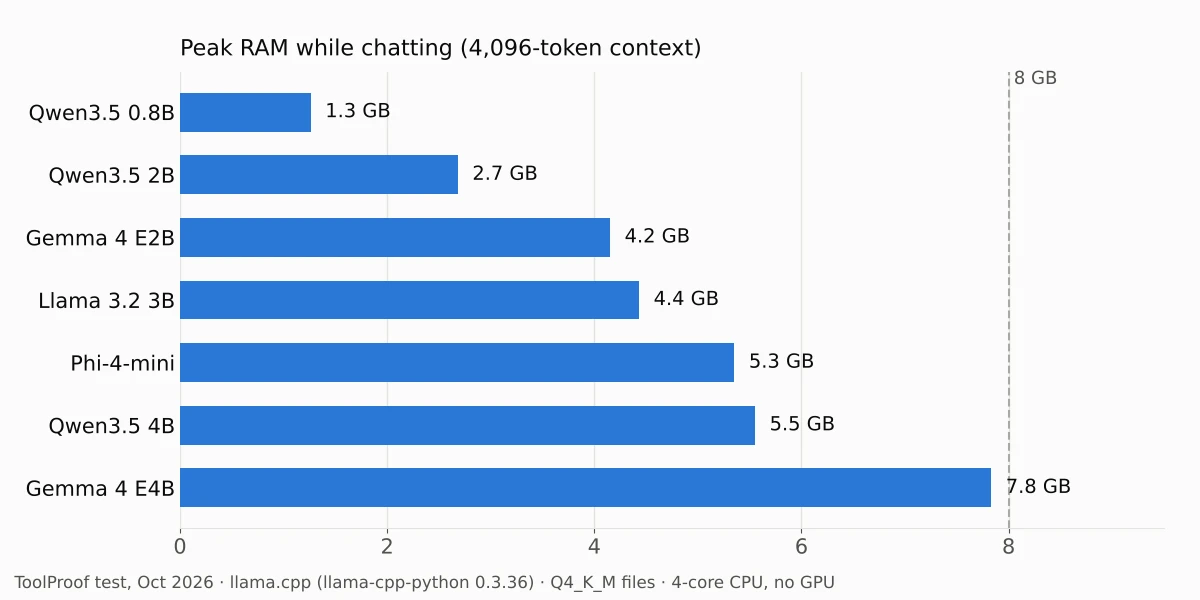
A 2B to 4B model needs roughly 3 to 6 GB of free memory, based on the peaks we measured with a 4,096-token conversation window. Gemma 4's "E" models use more memory than their names suggest: Google's Gemma 4 model card (opens in a new tab) lists E2B as 2.3 billion effective parameters but 5.1 billion including embeddings, which is why its file was more than twice the size of Qwen3.5 2B's.
Longer conversations and pasted documents use more memory than our test did, so leave some headroom. These models are far smaller than the ones behind ChatGPT or Gemini, so expect weaker answers on hard reasoning and recent events; none of them can look anything up online.
How to run an AI chatbot offline
The easiest way is a free desktop app that downloads the model for you and then runs it on your computer. We tested the models directly with llama.cpp, the engine LM Studio says it uses, rather than through these apps, so the details below come from each app's official documentation as of October 2026.
| App | Platforms | Cost and license | Offline once set up? |
|---|---|---|---|
| LM Studio (opens in a new tab) | Windows (x64 with AVX2, or ARM), Mac with Apple silicon on macOS 14 or later, Linux | Free plan for local models | Yes, according to its offline guide |
| Jan (opens in a new tab) | Windows, Mac, Linux | Free, Apache 2.0 license | Yes, "full offline support" |
LM Studio
- Install LM Studio from lmstudio.ai/download (opens in a new tab).
- Open the Discover tab and search for a model, such as "Qwen3.5 2B" or "Gemma 4 E2B".
- Go to the Chat tab, open the model loader and select the model you downloaded.
- Start chatting.
LM Studio's offline guide (opens in a new tab) says that once a model is on your computer, chatting, chatting with documents and its local server work without the internet, and that "nothing you enter into LM Studio when chatting with LLMs leaves your device." Searching for and downloading models, and checking for app updates, still need a connection. Its system requirements (opens in a new tab) recommend 16 GB of RAM, and it doesn't support Intel Macs.
LM Studio's website now leads with Bionic, an agent app with paid cloud plans. Its pricing page (opens in a new tab) says the free plan includes running local models; the paid plans add US-hosted cloud models, which are not offline.
Offline speech to text
For free offline transcription, use Parakeet TDT 0.6B v2 if your audio is English, or Whisper large-v3-turbo if you need the most accurate result and can wait. In our test of 8 free offline transcription models on a 22-minute conference call, Whisper turbo got 10.5% of words wrong and Parakeet v2 11.1%, but Parakeet finished in 1 minute 45 seconds versus 9 minutes 37 seconds. Free apps such as Vibe and Handy run Whisper and Parakeet (they offer Parakeet v3, which was a little less accurate in our test) without uploading your audio.
Offline image to text (OCR)
To copy text out of a screenshot or photo without uploading it, start with the tools already on your computer: Windows Snipping Tool's Text actions, or Live Text on a Mac or iPhone. For a folder of scans, the free NAPS2 app can add searchable text to scanned pages and PDFs. We didn't measure these tools; our guide to image to text offline has the steps from Microsoft's, Apple's and NAPS2's documentation.
How much RAM you need for offline AI
8 GB of RAM is enough for every model we measured except the largest chatbot; 16 GB gives you room for Gemma 4 E4B. The chart shows the peak memory of our chatbot and transcription picks, measured with each tool running alone.
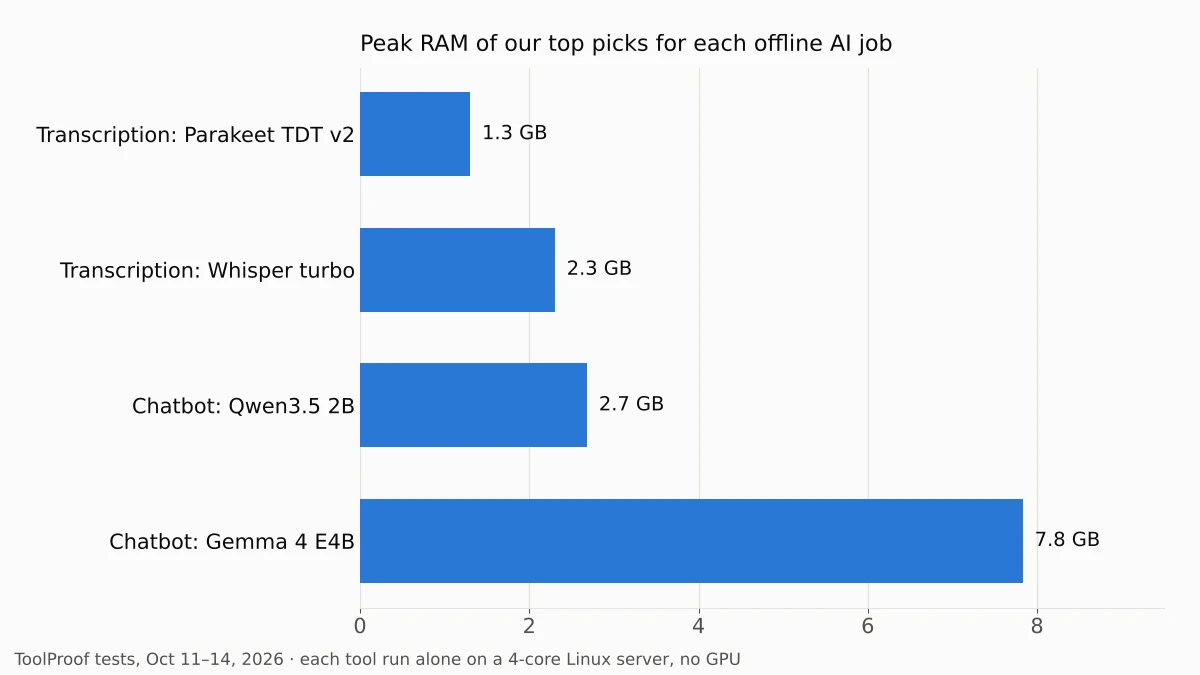
Your browser and other apps need memory too, so on an 8 GB computer, close what you don't need before running a 4B chatbot model. Some AI is already on your computer: Chrome, for example, can download an on-device model for its built-in AI features (news reports put it at roughly 4 GB), which you can turn off and delete if you'd rather use your own tools.
Other tools we looked at
- GPT4All by Nomic: a free, MIT-licensed desktop chatbot app that its website (opens in a new tab) says runs on your device with "no cloud required." We didn't include it in the table because we didn't confirm which current models it offers.
- Larger chatbot models (8B and up, such as Qwen3.5 9B or Gemma 4 12B): we skipped them because they need more memory than most laptops can spare and would be much slower without a graphics card.
- Llama 3.2 1B and other tiny models: our results for Qwen3.5 0.8B suggest models under 1 billion parameters are too unreliable for factual questions.
What we tested
- Chatbot engine: llama.cpp (through llama-cpp-python 0.3.36), the engine LM Studio says it uses, built for the test CPU, 4 threads, 4,096-token context, temperature 0. Each model ran alone in a fresh process. "Thinking" mode, where a model has one, was off, which is the default in the chat templates we used.
- Model files: 4-bit Q4_K_M GGUF files from Hugging Face: Unsloth's builds of Qwen3.5, Gemma 4 and Phi-4-mini, and Bartowski's build of Llama 3.2 3B.
- Email summary: a 253-word office-move email we wrote, with the instruction to summarize it in exactly 5 bullet points including every date and deadline. We timed three runs and checked the first for the bullet count and four dates (the move, packing deadline, badge pickup and a Wednesday deadline).
- 20 questions: 8 math word problems, 6 general-knowledge facts and 6 instruction or extraction tasks (for example, returning a JSON object or answering only YES or NO), all with answers we could check automatically. We reviewed every answer marked wrong by hand and accepted equivalent forms such as 1 7/8 for 1.875.
- Memory: the peak resident memory of the process, which includes the model file and the conversation cache.
- Machine: a Linux cloud server with 4 Intel Xeon cores at 2.3 GHz, 16 GB of RAM and no graphics card, October 14, 2026. The transcription test ran on October 11 on a 2.8 GHz 4-core server; see its article for the method.
FAQ
Is there an AI that works completely offline?
Yes. All the tools on this page run on your own computer after a one-time model download, and we ran every test with the models stored locally. Apps can still go online for updates, model downloads or optional cloud features, so check each app's settings if you need a computer that never connects.
Can I use these offline AI models for work?
Usually, yes, but check the license of each model. Qwen3.5 and Gemma 4 use Apache 2.0 and Phi-4-mini uses MIT, all of which allow commercial use, according to their Hugging Face pages. Llama 3.2 has its own Llama 3.2 Community License with extra conditions.
Is an offline chatbot as good as ChatGPT?
No, not for hard questions. The models in our test are a few billion parameters and run on a CPU, so they are best for drafting, rewording, summarizing and simple questions where you can check the answer. Their advantage is privacy and cost: your text stays on your computer and there is no subscription.